

Fully Qualified Domain Name (FQDN): How to Use It
TL;DR: A fully qualified domain name (FQDN) is the complete, unambiguous DNS name for a host or service, such as
www.example.com, and it can include an optional trailing dot:www.example.com.. Use the exact FQDN in DNS records and TLS certificates, and remember that each DNS label can contain up to 63 characters while the full name can be up to 253 characters.
If you have ever typed www into a browser or DNS tool and watched it work on one network but fail on another, the problem may be missing local context rather than a broken website. An FQDN such as www.example.com. removes that ambiguity: RFC 1034 distinguishes an absolute domain name from a relative name that needs local context. That small distinction causes real trouble for website owners, developers, system administrators, and businesses managing hosting. This guide covers FQDN structure, FQDN versus a domain and URL, DNS-record configuration, certificate validation, troubleshooting, and Kubernetes use cases.
| Point | Details |
|---|---|
| Complete DNS identity | An FQDN identifies a host or service through every DNS label, such as www.example.com, and its strict form ends at the root label. |
| Trailing dot context | The final dot is technically meaningful in DNS, although many public tools treat www.example.com and www.example.com. as equivalent. |
| Not a URL | An FQDN names a DNS resource, while a URL can also include a scheme, path, port, and query parameters. |
| Configuration matters | Use the correct absolute or relative form when editing DNS records, zone files, certificate validation settings, and application configuration. |
| Check every label | Each DNS label can contain up to 63 octets, while a complete DNS name can use up to 255 octets in wire format. |
What is a fully qualified domain name?
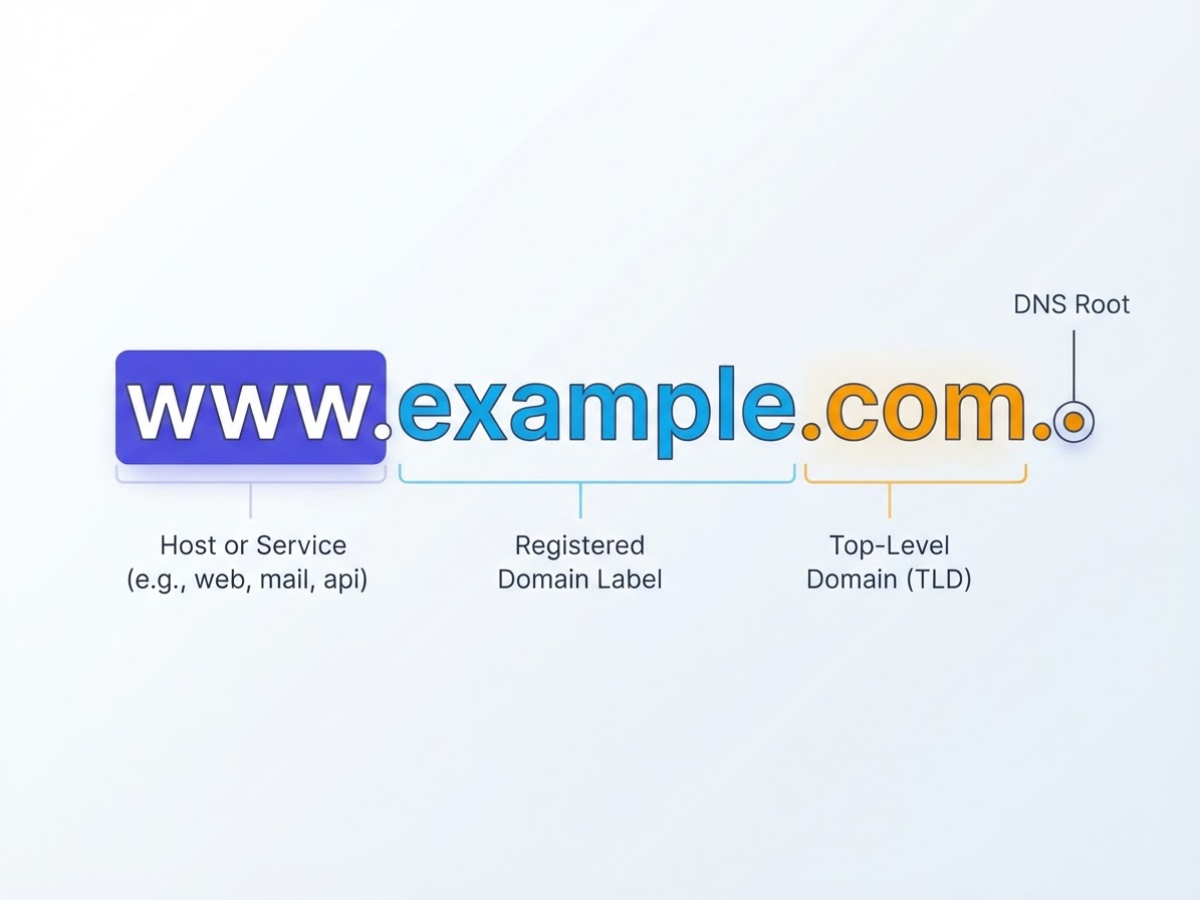
A fully qualified domain name (FQDN) is the complete DNS name for a specific host or service. It gives DNS the entire path from that target up to the DNS root, so the name does not depend on where you use it or on a local search suffix. In practical terms, www.example.com. means the same thing whether you enter it in a browser, a DNS record, or a server configuration.
Take this example: www.example.com.
| Part | What it identifies |
|---|---|
www |
The host or service label, often used for a website. It could instead be mail, api, or vpn. |
example |
The registered domain label. This is the name the owner registers. |
com |
The top-level domain (TLD). |
. |
The DNS root label, shown as a final dot in the strict form. |
People often call example.com the domain, but that is not the same as the whole FQDN www.example.com.. The registered domain is example.com, while www.example.com names a particular host or service beneath it. That distinction matters when you create DNS records or troubleshoot why mail works but the website does not. If you are still mixing up a domain purchase with the server that hosts it, this beginner’s guide to domain hosting clears up that separate relationship.
Strictly speaking, the final dot belongs in an FQDN. DNS documentation may show www.example.com. because the dot represents the zero-length root label. In everyday web addresses, control panels, and many tutorials, people omit it and write www.example.com; both forms usually refer to the same name. The DNS standards distinguish the strict root-terminated form from the commonly written form.
Pro Tip: Show the same name in strict and everyday notation side by side so readers understand why both forms appear in documentation.
By contrast, www alone is a short or relative hostname. A resolver can only complete it by applying local context, such as example.com, and another network might complete it differently. An FQDN can identify a public website, mail server such as mail.example.com, API endpoint, internal application, database service, or any other DNS target.
That label-by-label view makes the next question easier: how do you format an FQDN correctly in DNS records and configuration files?
When do you need an FQDN instead of a hostname?
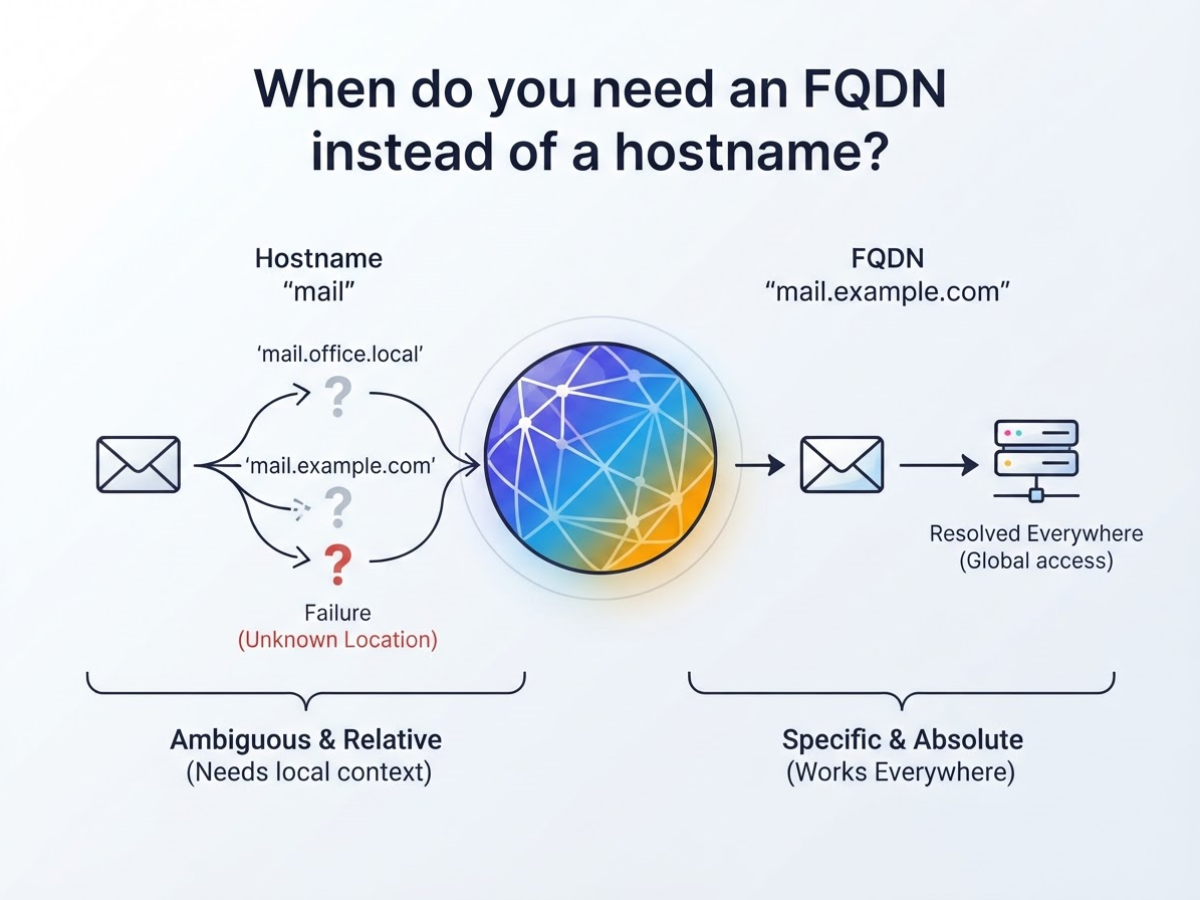
Use an FQDN whenever the name must identify the same service everywhere, not just on one machine. A short hostname such as mail may resolve to mail.office.local, mail.example.com, or nothing at all, depending on the search domains and local DNS settings. A relative DNS name needs local context to be completed, which is exactly why short names create confusing “works on my laptop” failures.
Where an FQDN earns its place
- User-facing services: Public websites, mail servers, customer portals, and APIs should use names such as
www.example.com,mail.example.com, orapi.example.com. Browsers, email clients, and outside users cannot depend on your office search domain. - Server-to-server traffic: Use a specific name for reverse proxies, database connections, queues, and monitoring targets.
database.prod.example.comcan identify an internal database without pretending thatdatabasemeans the same thing in every environment. - Security and certificates: SSL/TLS certificates must match the hostname a client requests. If your proxy serves
api.example.combut your application callsapi, certificate validation and routing can fail. The same issue appears in monitoring checks when the probe uses a different name from the certificate. - Automation: Scripts, deployment files, container configuration, and DNS records should use a stable FQDN. Hard-coded short names are a common cause of failed jobs after a server moves between networks.
Public and internal FQDNs are not opposites. mail.example.com may be publicly reachable, while database.prod.example.com may exist only in private DNS. Both are fully qualified because each states its complete DNS path.
Pro Tip: For production systems, document the intended FQDN before deployment rather than relying on whatever short hostname happens to resolve during testing.
Before choosing a short hostname, check:
- Must users outside your network reach it?
- Must it resolve identically across offices, VPNs, clouds, or regions?
- Must an SSL/TLS certificate match it?
- Do DNS records, email routing, monitoring, or automation depend on it?
If you answer yes to any item, use the FQDN. The next step is understanding how DNS represents and resolves that complete name.
FQDN vs domain name, hostname, URL, and DNS record
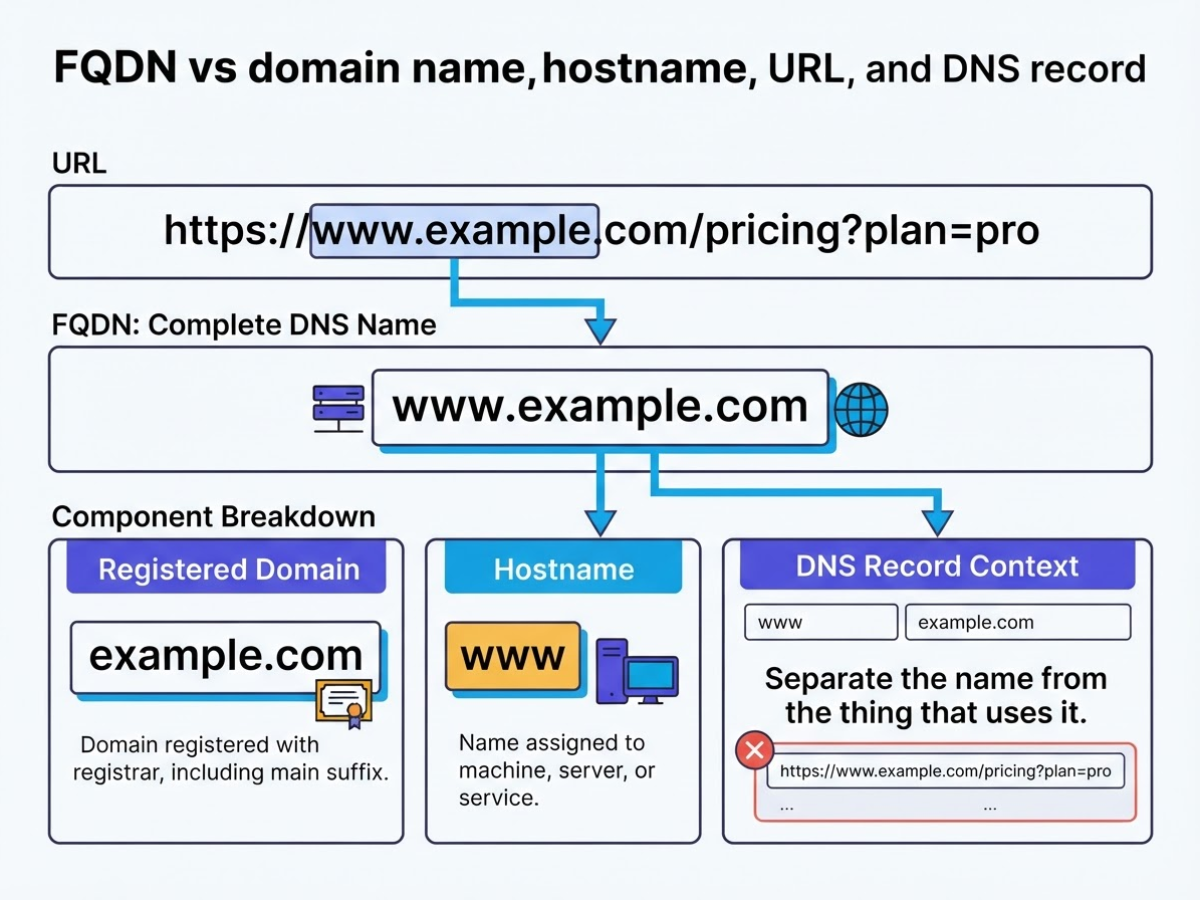
The quickest way to stop configuration mistakes is to separate the name from the thing that uses it. I have seen people paste a complete URL into a DNS field, then wonder why the record fails. These terms overlap in casual conversation, but they do different jobs.
Use this single example: https://www.example.com/pricing?plan=pro.
| Concept | What it identifies or does | Example from the URL or DNS setup |
|---|---|---|
| FQDN | The complete DNS name for a host or service | www.example.com or, in strict DNS notation, www.example.com. |
| Registered domain | The domain registered with a registrar, including its main suffix | example.com |
| Hostname | The name assigned to a machine, server, or service. In everyday usage, people often use it for the full host name | www, or more precisely www.example.com in this example |
| Subdomain | A label placed before the registered domain to create a separate name | www is the subdomain of example.com |
| URL | A complete web address that tells a browser how and where to request content | https://www.example.com/pricing?plan=pro |
| DNS record | A stored instruction that connects a DNS name to an address, alias, or other data | www.example.com A 203.0.113.10 |
The important distinction is that example.com may refer to the registered domain, while www.example.com is the host’s FQDN. The www label is optional. You could instead run shop.example.com, and that would be a different FQDN under the same registered domain.
A URL is not interchangeable with an FQDN. The URL includes the https:// protocol, the host, the /pricing path, and the ?plan=pro query string. DNS only needs the host name, www.example.com. This is also why understanding the difference between a domain name and web hosting prevents many setup errors.
Pro Tip: When troubleshooting, remove the URL scheme and path first; the remaining host component is the value that DNS needs to resolve.
DNS records add another layer of confusion. An A record maps a name to an IPv4 address, while an AAAA record maps it to an IPv6 address. A CNAME does not point directly to an address. It points one DNS name to another, such as www.example.com to example.com, and the resolver follows the target.
Once these labels are separated, choosing the right value for certificates, hosting panels, and DNS fields becomes much less guesswork.
How to find and configure an FQDN step by step
Start with the name people or systems will actually use, then work backward to the DNS record and service behind it. This avoids a common mistake: pointing example.com at a server when your hosting provider expects www.example.com, or configuring email for one name while your mail client uses another.
- Choose the service label and parent domain. Pick a label such as
www,app, ormail, then attach it to a registered domain. For example,app.example.comis the FQDN for an application, whilemail.example.commay identify a mail server. Keep labels short and consistent. If you still need hosting and a domain, clarify the difference between web hosting and a domain name before changing DNS. - Check the provider’s required destination. Open the hosting, email, or application setup instructions and copy the exact target. It may provide an IPv4 address for an A record, an IPv6 address for an AAAA record, a hostname for a CNAME, or custom nameservers that must replace your current ones. Do not guess from the server’s name. A single missing character can send visitors to the wrong service.
- Create the matching DNS record. Use an A record for an IPv4 address, AAAA for IPv6, CNAME when the provider gives you another hostname, MX for mail delivery, and TXT for verification or policies such as SPF. In a BIND zone file, a name without a final dot is relative to
$ORIGIN, somail.example.comcan be interpreted differently frommail.example.com.; BIND’s zone-file documentation explains this trailing-dot rule. Control-panel DNS editors often add the dot automatically, so do not paste one blindly into every field. - Verify resolution from more than one network. Query the exact FQDN with a DNS lookup tool such as
dig,nslookup, or an online checker. Check the record type and returned value, then repeat from mobile data and a separate Wi-Fi connection. DNS propagation is not a single global switch. TTL values, resolver caching, and an incorrect zone owner or nameserver can make one network show the old answer for hours. - Match the name everywhere else. Confirm that the TLS certificate covers the exact FQDN, the application’s allowed-host setting uses it, and HTTP redirects send users to the intended canonical name. For email, check the MX, SPF, DKIM, and any provider verification records, then test sending and receiving. Email-specific records are easy to overlook, so a domain mail setup guide can help you audit the setup.
Once the name resolves correctly and every service uses the same spelling, you can move on to the practical differences between FQDNs and related DNS terms.
Common FQDN mistakes that break DNS and certificates
Most FQDN failures are not caused by DNS itself. They come from putting the right-looking value in the wrong field, then chasing the wrong symptom for hours. I see this most often during migrations, certificate renewals, and rushed infrastructure changes.
- Pasting a URL into a DNS name field:
https://www.example.com/is a URL, not a DNS name. The scheme and slash can trigger a validation error or create a record nobody can resolve. Enterwww.example.cominstead, and keep the protocol and path in the application or redirect configuration. This distinction is as basic as the difference between a web host and a domain, but teams still mix them during setup. - Treating a relative name as an FQDN: In a zone file,
mailmay becomemail.example.com.because it inherits$ORIGIN; in another tool, it may remain justmail. A relative name needs local context, while an absolute name is complete. DNS specifications distinguish absolute and relative names. Use the full name when automation crosses zones, and check how the tool expands it. - Guessing about the trailing dot: BIND commonly treats
appas relative butapp.example.com.as absolute. Some APIs accept both forms, while others append a suffix or reject the dot. The symptom is a record created at the wrong level. Follow that tool’s rules instead of deleting or adding the dot by habit. - Issuing the wrong certificate: A certificate for
example.comdoes not automatically coverwww.example.com. You may also place the ACME TXT record under the wrong_acme-challengesubdomain. Match every served hostname to the certificate’s SANs, then validate the exact name users reach. - Breaking DNS syntax or limits: Spaces, underscores in unsupported record names, and other illegal characters can cause rejected records. A label cannot exceed 63 octets, and the complete DNS name cannot exceed 255 octets in wire format, as RFC 1035 documents. Case does not create a separate DNS name, so
WWWandwwwcompare as the same label. - Testing from one cached network: A stale resolver can show the old answer after you changed a record. Check authoritative nameservers and at least two independent public resolvers before calling the change broken. TTL controls how long caches retain an answer, so propagation delay is not proof of permanent failure.
Once these checks pass, the next step is confirming that your configured FQDN points to the service you actually intend to expose.
FQDNs in SSL certificates, email, and modern infrastructure
The certificate must name the address your users and systems actually reach. If your application runs at api.example.com, that hostname belongs in the certificate’s common name or, more commonly, its subject alternative names (SANs). A certificate for example.com does not automatically cover api.example.com, and *.example.com does not cover api.example.com.internal.example.com. I have seen this mismatch turn a routine deployment into browser warnings and failed service-to-service calls.
DNS-01 validation gives you a useful alternative when the service is private, load-balanced, or not ready to expose over HTTP. Your ACME client asks you to publish a TXT record at _acme-challenge.<YOUR_DOMAIN>. The certificate authority checks that value, proving you control the domain without needing to reach the application itself. DNS-01 also supports wildcard certificates, so one validation flow can cover *.example.com and many changing subdomains.
For email, keep the same discipline. Use one documented FQDN for the mail service, then align its MX, TLS certificate, reverse DNS, and application settings. A practical domain mail setup guide helps, but it cannot fix a certificate issued for mail.example.com when your client connects to smtp.example.com.
Kubernetes adds another layer of naming. With a Pod hostname of foo, subdomain bar, namespace my-namespace, service domain svc, and cluster domain cluster.local, Kubernetes can construct this Pod FQDN: foo.bar.my-namespace.svc.cluster.local. The Kubernetes DNS documentation describes this construction and its limits. Long names are not merely ugly: when setHostnameAsFQDN: true is enabled, Linux has a documented 64-character hostname constraint, so the Pod can fail before your application starts.
Use these milestones when standardizing names:
- Before deployment: choose the public and internal FQDNs, record the owner, and decide which names belong in certificate SANs.
- During validation: create the
_acme-challengeTXT record, verify DNS propagation, and issue the certificate before switching traffic. - After release: monitor DNS answers, certificate expiry, MX and reverse-DNS alignment, and Kubernetes naming errors.
- Every renewal cycle: confirm the DNS API credentials still work, renew early, and remove stale names from certificates and records.
That checklist prevents the most expensive kind of naming problem: a small spelling change that reaches DNS, TLS, email, and cluster configuration at once. The next section turns these rules into a practical FQDN configuration workflow.
My honest take on using FQDNs
I have seen small-business owners spend far too much time treating an FQDN as a DNS vocabulary test. In practice, I use it to remove ambiguity: mail.example.com should identify one intended service, not leave a hosting panel, email client, certificate, and support agent guessing which name you meant. That matters when I am setting up business email, moving a website, or checking an affordable domain account after a change.
Here is the contrarian part: most people do not need to type the terminating dot in an FQDN. Forcing strict notation such as mail.example.com. into every customer-facing instruction adds friction and creates avoidable support questions. I reserve that detail for technical work, where the root-label distinction matters. In a zone file, automation script, or DNS debugging session, the final dot can prevent a name from being treated as relative and accidentally appended to the wrong zone.
My practical rule is less clever naming and more readable, stable names. I document who owns each hostname, test the exact names used by the application, and compare them with the names listed on TLS certificates. A website can load while email still fails, which is why I check both instead of assuming the domain is “working.” Small teams do not need enterprise rituals, but they do need written ownership and names that will still make sense after the original setup is forgotten.
— AVM Cloud Content Strategy Team
Set up the right domain and hosting for your FQDN
When I review a client’s DNS setup, the avoidable mistakes usually start before anyone creates a record: the domain name, host name, and mailbox name were never agreed on. Choose the domain and service names first, then confirm which FQDN each service needs, where hosting will run, and which DNS records your provider expects. Publishing records too early creates confusing conflicts, especially when web hosting and email use different services.
DomainAdda is a practical next step if you need affordable domain registration and hosting in India, but the configuration still needs checking on your side. Before deciding, read the guide to the difference between a domain and hosting and review the business email setup guide. That small planning step can prevent an incorrectly formed FQDN, missing verification record, or mailbox that never receives mail.
Frequently Asked Questions
Is www.example.com an FQDN?
Yes. www.example.com is commonly treated as an FQDN because it includes the host label, domain, and top-level domain. In strict DNS notation, you can write it as www.example.com. with the final dot representing the 1 root label.
What is the difference between an FQDN and a DNS name?
An FQDN gives the complete DNS path and can be resolved without adding a local search domain. “DNS name” is the broader term, covering both a complete name such as mail.example.com and a relative name such as mail.
Does an FQDN have to end with a dot?
Technically, yes, the absolute DNS form ends with 1 dot for the root label, such as server.example.com.. Browsers, hosting panels, and managed DNS services often omit or accept that dot, so both written forms usually point to the same name.
How do I check whether a domain is fully qualified?
Confirm that the name contains its complete label path through the top-level domain and does not rely on a local search suffix. Run a lookup with nslookup or dig, then check whether the result resolves consistently from at least 2 networks.
Can an IP address be an FQDN?
No. An IP address identifies a network endpoint with numbers, while an FQDN uses DNS labels such as api.example.com; a DNS record can connect the two. For example, an A record can map 1 FQDN to an IPv4 address such as 203.0.113.10.
Recommended reads
- What Is Domain Hosting A Beginners Guide
- Domain Mail Setup Guide For Business Email
- How To Host A Website Step By Step Guide
- Google Workspace Email Hosting Setup Guide
Sources
- DNS Terminology
- RFC 1034 – Domain names – concepts and facilities
- Domain names – implementation and specification
- RFC 1035 – Domain names – implementation and specification
- BIND 9 Administrator Reference Manual
- Supported DNS record types – Amazon Route 53
- DNS Queries and Lookups in Windows and Windows Server
- Challenge Types – Let’s Encrypt
- DNS for Services and Pods