

Connecting Bulk SMS API to Your Website or App
/ l lTL;DR: Connect a Bulk SMS API to your website or app through two flows: send requests for OTPs, order updates, reminders, and campaigns, then webhooks for delivery reports and replies. Choose an India-ready provider, register sender details, validate phone numbers, test at least 3 real delivery scenarios, and launch gradually so failed messages, duplicate alerts, and compliance issues stay out of customer conversations.
When a customer submits a form or places an order, your website or app should send the SMS immediately, not leave someone copying phone numbers into a dashboard. I’ve seen this setup frustrate developers and small-business owners using AVM Cloud or DomainAdda services, especially when delivery errors appear only after launch. Start with valid data: E.164 phone numbers begin with “+” and contain no more than 15 digits. The work covers provider selection, API authentication, request payloads, delivery responses, webhooks, Indian sender compliance, testing, error recovery, and production monitoring.
| Point | Details |
|---|---|
| Choose Your API | Compare authentication, delivery reports, webhook support, documentation, pricing, and Indian sender-registration requirements across at least 3 providers before integrating. |
| Normalize Numbers | Store every recipient in E.164 format, starting with “+” and containing no more than 15 digits. |
| Build Safely | Keep credentials server-side, validate inputs, add idempotency controls, and log provider responses without exposing message secrets. |
| Test The Journey | Before launch, test at least 6 cases, including successful sends, invalid numbers, rate limits, provider errors, delivery callbacks, and opt-outs. |
| Monitor Delivery | Track 4 statuses separately, accepted, delivered, failed, and undelivered, so support teams can identify where messages stop. |
What a Bulk SMS API Connection Actually Does
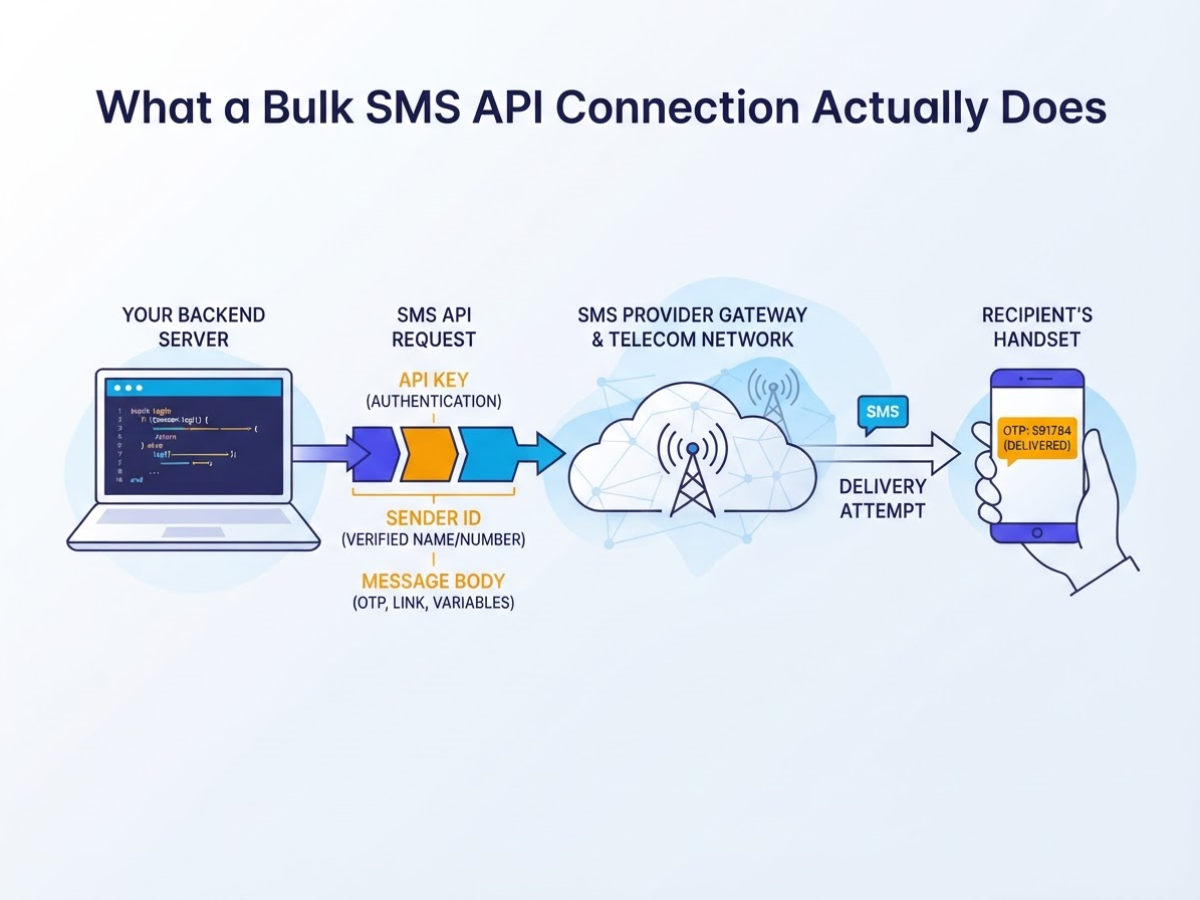
A bulk SMS API connection lets your website or app request a text message when something happens. A customer submits a signup form, your backend creates an OTP, the backend sends the request to your SMS provider, and the provider passes it through the telecom network to the recipient’s handset. The provider handles carrier routing and delivery attempts. Your code decides when to send, what to say, and who should receive it.
A typical request contains these parts:
| Part | What it controls |
|---|---|
| API key | Authenticates your server with the SMS provider. Keep it out of browser and mobile-app code. |
| Sender ID or header | The name or number shown as the sender, subject to local carrier rules. |
| Message body | The text, including an OTP, order number, link, or other variables. |
| Recipient number | The destination in an international format. E.164 numbers start with + and contain no more than 15 digits. |
| Delivery report | The provider’s status, such as accepted, delivered, expired, or failed. |
That differs from a manually uploaded bulk campaign. With an upload, someone selects a spreadsheet, writes a message, schedules a send, and reviews a dashboard. An API sends one message or many because an application event fires. OTPs, password resets, shipping updates, and payment alerts are transactional. A festival offer sent to 50,000 opted-in contacts is promotional and needs separate consent, template, timing, and unsubscribe handling. In India, commercial senders also need Principal Entity registration, registered headers, and content templates under TRAI’s sender requirements.
The API response is usually synchronous: it tells your server whether the provider accepted the request and returns a message ID. That does not prove the phone received the text. Delivery usually arrives later through an asynchronous webhook, so your backend must store the message ID, process status changes, retry safely, and alert someone when failures spike. Webhooks become a nuisance when teams forget to secure or monitor them.
Pro Tip: Design the integration around message events rather than individual screens so the same notification logic can serve a website, mobile app, and admin dashboard.
The provider manages telecom delivery, but you own consent, application logic, API-key security, logging, rate limits, and monitoring. Those responsibilities shape the components your integration needs.
Is API-Based Bulk SMS Right for Your Website or App?
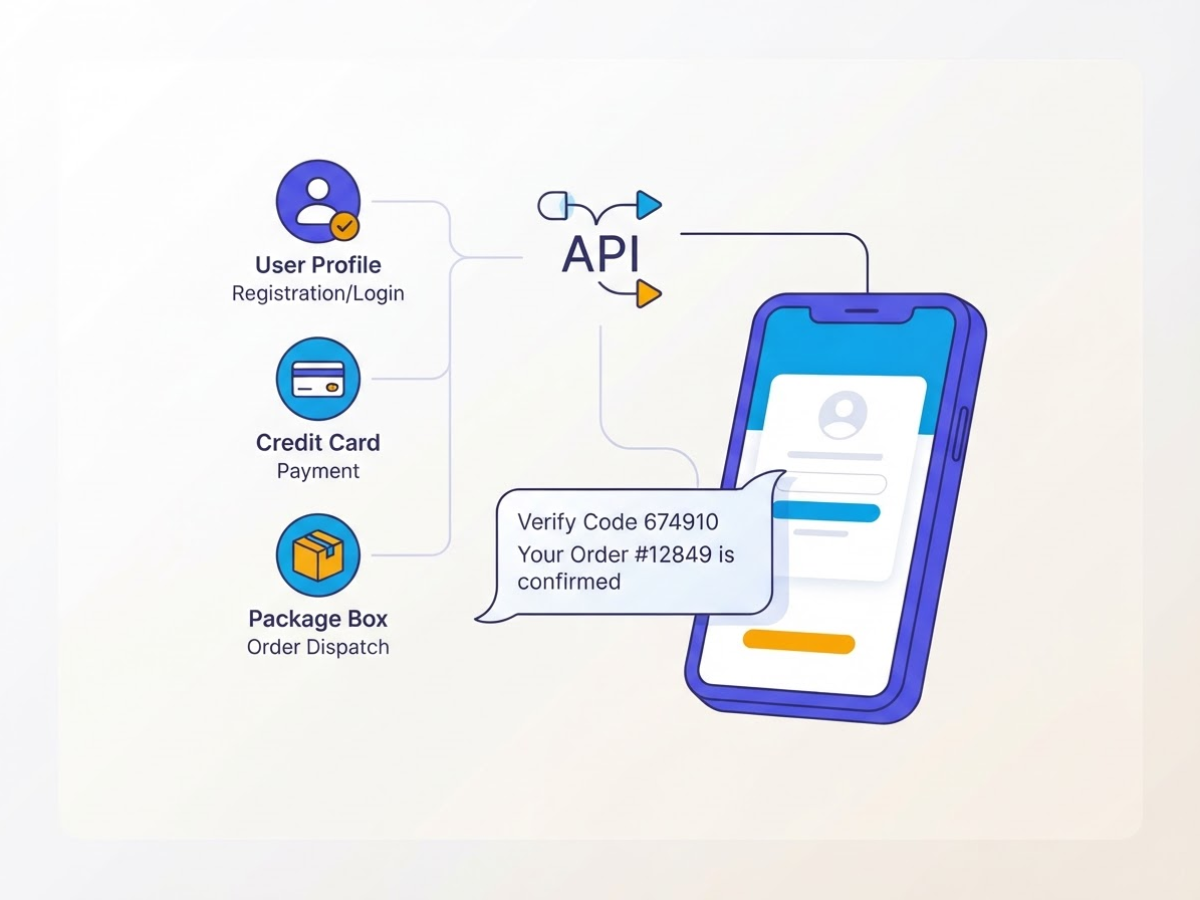
The right choice depends on what causes the message, not on how impressive the provider’s dashboard looks. If your website or app needs to send a text immediately after a user action, an API usually earns its place. Typical triggers include:
- Registration confirmation and login verification codes
- Payment success, failure, or refund notices
- Order dispatch and delivery updates
- Appointment reminders and schedule changes
- Support-ticket updates, password resets, and security alerts
A direct connection also lets your application pass the correct name, order number, expiry time, or tracking link into each message. That saves support staff from copying data between systems, but it adds development work. Your team must handle authentication, retries, duplicate requests, phone-number formatting, error logs, and message templates.
For occasional promotions, a dashboard or plugin is usually the saner choice. If you send two campaigns a month and a person approves every recipient list, custom code is expensive decoration. A dashboard gets the campaign out faster, while a plugin may connect forms or an e-commerce site without a full engineering project. For broader channel coverage, a platform such as DomainAdda can bring SMS-related customer conversations alongside WhatsApp, Facebook, Instagram, and live chat.
Before choosing a provider, check these details in the documentation, not just the sales call:
| Check | What you need to confirm |
|---|---|
| Integration | REST endpoints, SDKs, authentication, sandbox, and clear examples |
| Operations | Delivery reports, webhooks, retry behavior, throughput limits, and queue handling |
| Commercials | Per-message pricing, failed-message charges, minimum volume, support hours, and regional coverage |
India adds paperwork. TRAI requires bulk senders to register as Principal Entities and register applicable headers and content templates; consent templates and message-category rules also apply. Commercial headers are registered alphanumeric strings of no more than 11 characters, so sender approval can delay launch if you leave it until the last week.
Pro Tip: Ask providers how failed messages, duplicate requests, sender approval delays, and number-format errors appear in their logs before comparing headline per-SMS prices.
Start with a test environment and a pilot of 100 to 1,000 messages across real use cases. Test invalid numbers, retries, delivery callbacks, opt-outs, and peak bursts before tying production alerts to one vendor. Clean results make the integration easier to plan.
How to Connect the API: From Credentials to First Send
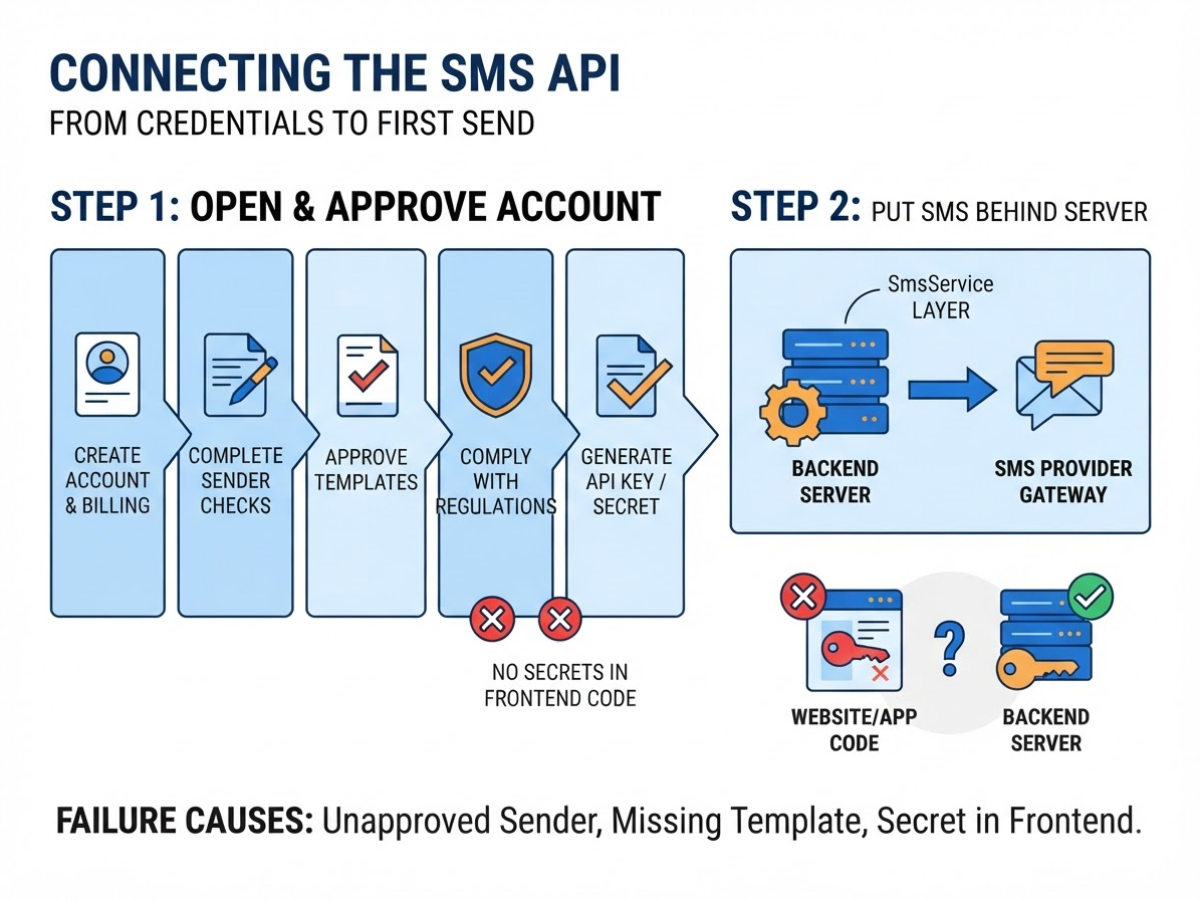
Start with the provider’s onboarding checklist, not your code. The first failed send often comes from an unapproved sender, missing template, or secret pasted into frontend code.
- Open and approve the account. Create the provider account, add billing details, and complete sender, template, and compliance checks. If you send in India, Principal Entity registration is required for bulk SMS senders, along with the relevant header and content template. Generate an API key, secret, or access token only after approval, then store it in server environment variables such as
SMS_API_KEYandSMS_API_SECRET. Never commit them to Git or place them in a browser or mobile build. - Put SMS behind your server. Add an
SmsServicelayer to your backend. Your website or app should call your endpoint, and that service should call the SMS provider. This keeps credentials private and gives you one place to handle provider changes, bulk SMS setup decisions, rate limits, and logging. - Define one predictable payload. Use fields such as
recipient,sender,template_idormessage,variables, andreference_id. Normalize the recipient to E.164 format, which starts with+and allows no more than 15 digits. Accept only an approved sender and template, then reject missing variables before making the provider request. - Send and capture the response. Your app sends a request to your backend, the SMS service validates it, and the service sends an authenticated HTTPS request to the provider. Store the provider’s message ID, your internal
reference_id, status, and timestamps. Return your internal notification ID to the app, not the provider’s raw response.
Pro Tip: Return your own internal notification ID to the frontend immediately and process provider delivery updates asynchronously; users should not wait for the telecom network.
- Handle failure deliberately. Set a timeout of 5 to 10 seconds, retry temporary network or 5xx failures with exponential backoff, and stop retrying permanent errors such as invalid numbers. Use idempotency keys or your
reference_idso a timeout does not create duplicate texts. Log structured fields including request ID, recipient hash, provider status, latency, and error code. Do not log message content or secrets. - Register delivery webhooks. Configure a delivery-status URL and, if needed, an inbound-message URL. Providers can send an HTTP POST or GET request when an incoming SMS arrives, as Twilio’s webhook documentation explains. Verify the signature, timestamp, or shared secret before updating a notification, and reject old or replayed requests.
- Test in controlled stages. Send one approved recipient a real message, confirm the delivery callback, and inspect your logs. Then use a small internal group before routing production traffic. Some accounts remain in a sandbox, where messages go only to verified numbers and up to 10 destinations may be verified, so check that restriction before debugging your application.
Once the first controlled send works, map message events to the customer journeys that trigger them.
Common Integration Mistakes That Break SMS Delivery
Most SMS failures I have seen were not caused by the provider. They came from shortcuts in the application, usually during a rushed launch or a late-night fix. A request that appears successful can still produce duplicate messages, rejected traffic, or no handset delivery at all.
Watch for these mistakes:
- Exposing credentials: Never put an API key in JavaScript, a mobile app, a public repository, or a client-side network request. Users can inspect all of those. Keep secrets on your server, rotate them after a suspected leak, and redact keys, message bodies, and phone numbers in logs.
- Ignoring message encoding: GSM-7 allows 160 characters in one segment and 153 characters per segment in a concatenated message. A curly quote, emoji, or non-Latin character can switch the message to Unicode, where splitting starts between characters 70 and 71. One paid segment can become two or more, so check encoded length before sending.
- Sending twice: Frontend retries, payment-provider callbacks, queue replays, and browser refreshes can all repeat the same request. Give each business event an idempotency key, store its send state, and make workers safe to retry. “The user clicked once” is not a sufficient safeguard.
- Skipping validation and approval: Normalize numbers to E.164 format, such as
+14155552671, before they enter your queue. Also verify the sender ID, registered templates, consent records, and local sending rules. In India, commercial traffic needs an approved header and content template. Do not send promotions at 2 a.m.; timing your bulk SMS sends for maximum engagement also means respecting quiet hours and recipient expectations. - Treating acceptance as delivery: A
200 OKor provider message ID usually means the API accepted the request. It does not prove that a carrier delivered the SMS or that the handset received it. Process delivery-status webhooks, distinguish delivered, failed, expired, and undeliverable states, and alert when failure rates or latency rise.
Set a per-number and per-account rate limit, use a dead-letter queue for messages that keep failing, and alert on queue age, provider errors, and sudden cost changes. Keep retry counts finite. Blind retries create a bigger incident, not better delivery.
SMS authentication deserves extra caution. Number theft, SIM swaps, reassignment, and telecom signalling weaknesses make SMS a restricted authentication method, not a universal replacement for passkeys or authenticator apps. Use it as a fallback where the risk is acceptable, with short-lived, single-use codes.
With these failure paths covered, you can judge delivery from provider events rather than the first API response.
How to Launch, Measure, and Scale the Integration
A production launch needs more than a successful test message. I treat the first 30 days as a controlled release, because a demo can pass while queues, carrier filtering, or webhook retries quietly damage real campaigns.
Set a baseline before sending. Track API acceptance rate, delivered rate, failure rate, median time to delivery, OTP completion, click-through rate, opt-outs, and cost per successful outcome. For OTPs, record the full journey from request to verified code, not just the API response. NIST requires SMS-style authentication secrets to contain at least six digits and expire within 10 minutes.
Use this launch timeline:
- Days 1–2: Test with internal numbers across carriers. Confirm E.164 formatting, message rendering, links, sender identity, opt-out handling, and duplicate-request protection.
- Days 3–5: Run staging with sandbox or production credentials, approved sender assets, registered templates, webhook signature verification, dashboards, and test-number allowlists. Write a rollback procedure that disables sending without taking the whole app offline.
- Week 2: Release to 5–10% of eligible traffic. Compare delivery, failure, completion, and cost figures with your baseline before increasing volume.
- Weeks 3–4: Expand by traffic type and country, keeping a named owner for alerts and incident response.
When delivery drops, identify the layer instead of blaming the API. Provider throughput limits appear as throttling or rate-limit errors. Application queue delays show a long gap before submission. Carrier failures arrive after acceptance, while unreachable numbers usually produce invalid, inactive, or undeliverable responses. A provider can allow only 3 messages per second for US toll-free SMS by default, while short codes can exceed 100 messages per second, so check the account limit before rewriting your queue. (Twilio documents these throughput differences.)
Send bulk campaigns through a durable queue with retries, idempotency keys, and a pause button. For transactional traffic, use controlled concurrency so a login spike does not consume capacity needed for payment or security messages. Set alerts for delivery degradation, rising error codes, low balance, failed webhooks, and unusual send volume.
Once a month, review templates, consent records, spend, sender reputation, and inactive recipients. This catches stale lists and expensive message patterns before the next campaign magnifies them. Those controls lead to the safeguards that keep SMS failures from becoming customer-facing incidents.
My honest take on connecting a Bulk SMS API
I judge a bulk SMS API by the workflow around it, not by the provider’s lowest per-message price. In projects I advise, lasting integrations usually start with one narrow job, such as order updates or login verification. Once delivery reports, consent records, retries, and failed-number handling work reliably, the team can add reminders or campaigns without turning every message into a support issue.
Here’s the contrarian part: a direct API is not always the right first step. A small business sending two occasional campaigns each month can create more risk by building an integration than by using a dashboard, plugin, or managed connection. The API becomes worthwhile when SMS is tied to repeatable actions in your website or app and manual sending starts causing missed messages or duplicated work.
I pay closer attention to secret management, opt-out handling, delivery logs, alerts, and a fallback process than to a polished demo. API keys committed to a repository and silent failures will hurt you faster than an unattractive interface. The annoying work is also the important work: testing provider timeouts, checking message templates, and deciding what support staff should do when delivery stops.
I would evaluate AVM Cloud and DomainAdda when affordable hosting, email, and SMS workflows need to fit a practical budget, but I would not claim either provider suits every workload. The right choice depends on traffic, compliance needs, and how much engineering control you need.
— AVM Cloud Content Strategy Team
Connect Your SMS Workflow With AVM Cloud
If you are still copying alerts between your website, app, and SMS dashboard, review that workflow before buying anything. In client setups, the first headache is usually not the API call. It is deciding which event deserves automation, registering the sender, confirming consent, and estimating message volume without inflating the budget. DomainAdda brings hosting, domains, email marketing, and SMS marketing into one affordable ecosystem, so you can discuss those details in one place through its business hosting and marketing services.
Start with one small test, such as an order update or appointment reminder. Document the message template, opt-in process, API access, and hosting requirements, then measure delivered messages and the customer outcome that matters. The step-by-step bulk SMS setup guide can help you move from that plan to implementation without guessing. Expect some setup friction, especially around sender approval and consent records.
Frequently Asked Questions
What programming languages can be used with a Bulk SMS API?
In integrations I have supported, teams have used PHP, JavaScript or Node.js, Python, Java, Ruby, and other languages that can send HTTPS requests, giving you at least 6 practical choices. Your server still needs provider authentication, correctly formatted payloads, secure secrets, and error handling, because a tiny JSON mistake can waste hours of debugging.
How long does it take to integrate an SMS API into a website?
A basic proof of concept can take 2 to 4 hours, while a production connection usually takes several days to a few weeks once you add webhooks, queues, message templates, monitoring, and failure handling. For Indian sending, sender registration and content-template approval can delay live messages even when the code is already working.
Can I send OTPs and promotional messages through the same SMS API?
Often, yes, but OTPs and promotions need 2 different message categories, sender headers, templates, consent records, and operating rules. Keep both workflows separate in your code and reports, since a marketing template change should never interfere with a login code.
Why is my SMS API request successful but the message not delivered?
A successful API response usually means the provider accepted or queued the request, not that the handset received it, so check delivery callbacks and the final status. In practice, inspect 6 causes: number formatting, sender or template approval, carrier errors, account balance, recipient availability, and throughput limits.
Is SMS secure enough for two-factor authentication?
SMS can verify a user, but it remains a restricted authentication method because number reassignment and weaknesses in telecom networks can expose a code. Use a short-lived, one-time secret, such as a 6-digit code that expires quickly, protect account recovery, and offer an authenticator app or security key for high-risk accounts.
Recommended reads
- How To Choose The Right Bulk Sms Provider In India
- Step By Step Bulk Sms Setup With Domainadda
- Avoiding Common Bulk Sms Marketing Mistakes
- Integrating Bulk Sms With Email Marketing
Sources
- Advice to Senders | Telecom Regulatory Authority of India | Government of India
- Using the Amazon SNS SMS sandbox – Amazon Simple Notification Service
- What is E.164? | Twilio
- Messaging Webhooks | Twilio
- Best Practices for Scaling with Messaging Services | Twilio
- How long can a message be? | Twilio
- Messaging Services | Twilio
- Authenticators
- NIST Special Publication 800-63B