

Domain Mail: Setup Guide for Business Email
TL;DR: Domain mail is a professional address such as you@yourbusiness.com that uses your own domain instead of Gmail or Yahoo. To set it up, choose a mailbox service, connect the domain, publish three DNS records, SPF, DKIM, and DMARC, then test delivery and fix configuration mistakes.
A free Gmail address works for personal messages, but hello@yourbusiness.in gives customers, suppliers, and clients a clearer business identity. Owning a domain or running a website does not automatically create a working mailbox. Worldwide email users are projected to increase from 4.481 billion in 2024 to 4.970 billion by 2028, so getting your address right matters. The practical setup involves choosing a mailbox, verifying the domain, adding DNS authentication, testing delivery, and maintaining the account.
| Point | Details |
|---|---|
| Professional identity | Use an address such as hello@yourdomain.com instead of a free consumer mailbox. |
| Mailbox required | Registering a domain does not create an inbox, so you still need email hosting. |
| DNS authentication | Publish SPF, DKIM, and DMARC, then allow up to 48 hours for DNS changes to reach major providers. |
| Test before launch | Check sending, receiving, mobile access, aliases, forwarding, and spam placement. |
| Protect reputation | Keep complaint rates below 0.1%, use strong passwords, and review authentication records after provider changes. |
Table of Contents
- What Is Domain Mail and How Does It Work?
- Is Domain Mail Worth It for Your Business?
- How to Set Up Domain Mail in 7 Practical Steps
- Domain Mail Mistakes That Cause Delivery Problems
- Domain Mail vs Free Email: Which Should You Choose?
What Is Domain Mail and How Does It Work?
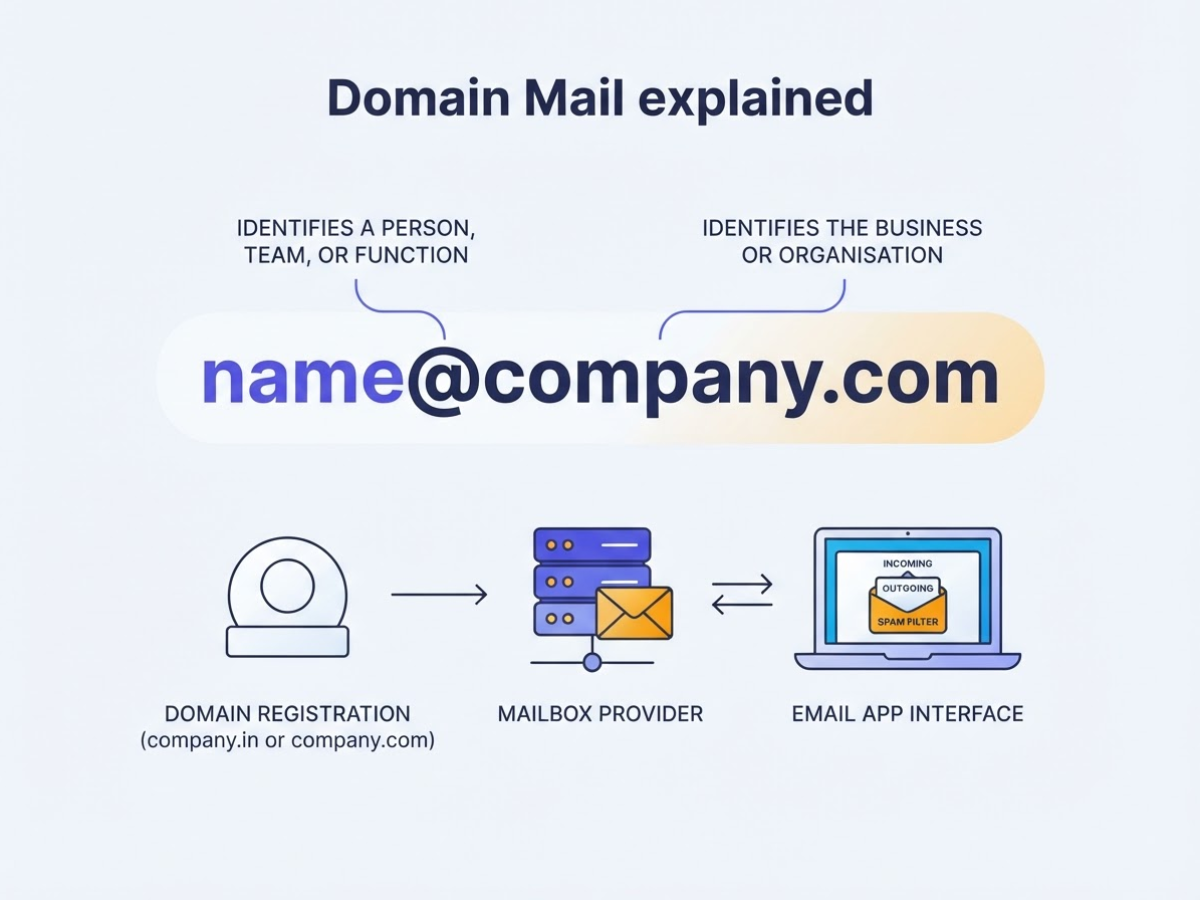
Domain mail is an email service connected to your own domain. Instead of sending from companyname@gmail.com, you send from sales@company.in or name@company.com. The part before @ identifies a person, team, or function. The part after it identifies the business.
The domain itself does not store messages. A mailbox provider stores incoming mail, sends outgoing messages, filters spam, and provides webmail. Outlook, Apple Mail, and Gmail are interfaces for reading and writing those messages, not replacements for email hosting.
Here is the distinction that causes the most confusion during setup:
| Service | What it does |
|---|---|
| Domain registration | Reserves company.in or company.com for you for a set renewal period |
| Website hosting | Stores website files so browsers can load your pages |
| Email hosting | Stores and sends messages for addresses using your domain |
You can buy all three from one provider, but they remain separate services. A website can work while email is broken, or email can work without a website. Our support team sees this mix-up often, particularly after someone changes hosting and assumes the mailboxes moved too.
DNS connects the pieces. The domain’s MX records, or Mail Exchange records, tell other mail servers where to deliver incoming messages. If an MX record points to an old service, mail can bounce or arrive in the wrong account. The edit is simple in theory and irritating in practice because updates take time to appear everywhere.
A domain mail plan can include:
- Individual mailboxes such as
support@company.com - Shared addresses several staff members can access
- Aliases that deliver multiple addresses to one inbox
- Forwarding to another email account
- Storage and attachment limits
- Spam filtering and malware checks
- Browser-based webmail
Pro Tip: Choose the domain before choosing the mailbox provider so the address stays consistent across invoices, websites, and marketing materials.
Next, compare the features with the way your team actually handles messages.
Is Domain Mail Worth It for Your Business?
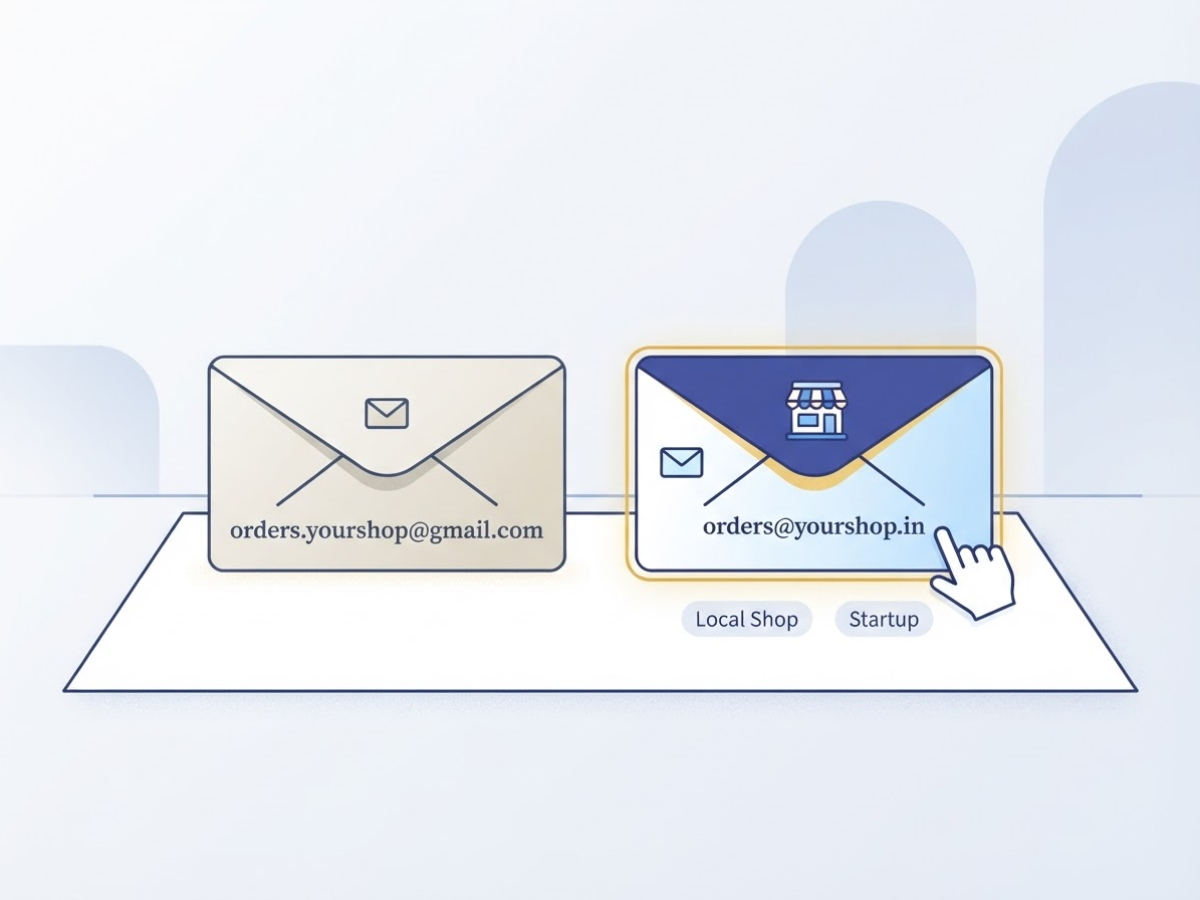
A custom address earns its keep when customers, students, or clients see it often. A freelancer can use hello@yourname.com, while a local shop can use orders@yourshop.in instead of asking customers to trust a personal Gmail address. The branded address will not fix weak service, but it gives the first interaction a more established context.
I have seen domain mail work well for freelancers, startups, local shops, agencies, schools, and support teams. It becomes more useful when several people answer customers, preserve conversations after an employee leaves, or send newsletters from one business identity. For broader campaigns, compare the provider’s features with this email service setup guide instead of assuming every mailbox plan includes marketing tools.
Choose the simplest arrangement that matches the work:
| Situation | Sensible setup |
|---|---|
| One owner handles every message | One mailbox, such as name@domain.com |
| One person needs several public addresses | One mailbox with aliases such as sales@ and info@ |
| Several people answer the same requests | A shared inbox for support@ or billing@ |
| Each employee needs private mail and permissions | Separate user accounts |
Pro Tip: Create role-based addresses such as support@ or billing@ before adding many individual mailboxes; they remain useful when staff members change.
Before buying, check storage per user, included accounts, spam filtering, mobile access, backups, support hours, and migration tools. A low price becomes frustrating if you cannot export old messages or recover a deleted mailbox. Also confirm whether the provider separates website hosting from email, since web hosting and a domain name serve different jobs.
Domain mail improves professionalism, but it does not guarantee inbox placement or stop phishing. Set up SPF and DKIM, then use DMARC as sending volume grows. Google requires senders to personal Gmail accounts to use SPF or DKIM, but authentication cannot rescue spammy content, poor list quality, or a compromised account.
The next decision is the number of addresses and users your business needs.
How to Set Up Domain Mail in 7 Practical Steps
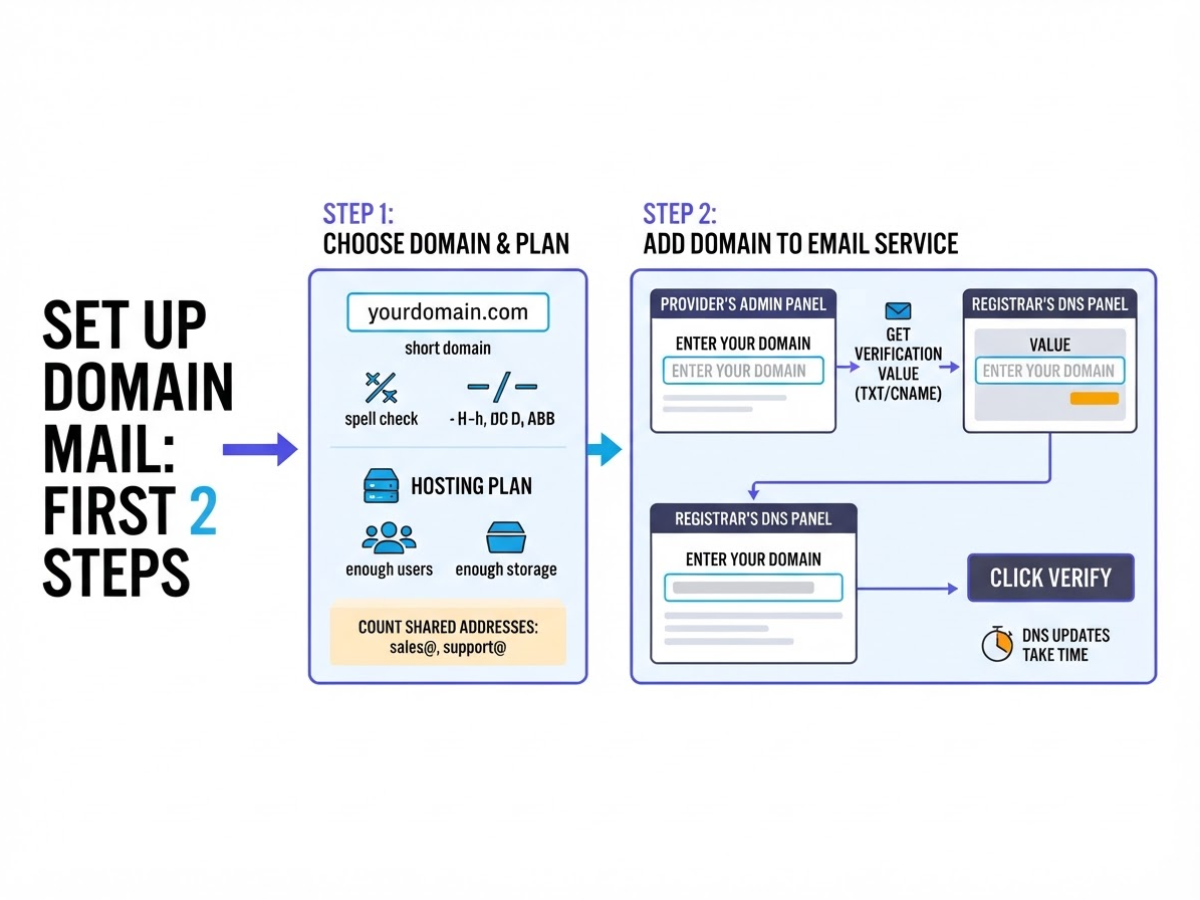
- Choose the domain and plan. Pick a short domain people can spell after hearing it once. Avoid hyphens, double letters, and abbreviations that force callers to repeat themselves. If you still need a name, this guide to choosing and registering an AI domain covers the same naming decisions. Count shared addresses such as
sales@andsupport@before buying, because providers often charge for each mailbox. - Add the domain to your email service. In the provider’s admin panel, choose “Add domain” and enter the exact domain. The service will give you a TXT or CNAME verification value. Add it at your registrar’s DNS panel, wait for it to appear, and click Verify. DNS updates take a few minutes or, annoyingly, several hours.
- Replace the MX records. Copy the provider’s MX hostnames and priority numbers exactly. Delete old MX records when the new provider instructs you to do so; leaving both sets active can send messages to the wrong inbox. One character, priority, or hostname mistake can break incoming mail.
Pro Tip: Record the old MX, SPF, DKIM, and DMARC values before changing anything so you can identify conflicts or roll back safely.
- Create users and mail rules. Make the primary mailboxes first, such as
name@yourdomain.com. Add aliases for role addresses, forwarding only where necessary, and a professional signature with your phone number and website. Turn on recovery options and app-based two-factor authentication for every administrator. - Publish SPF, DKIM, and DMARC. Add the SPF TXT record and DKIM record supplied by your provider. Google requires senders emailing personal Gmail accounts to use SPF or DKIM authentication. Add DMARC at
_dmarc.yourdomain.com; it checks whether the visible From domain aligns with an authenticated SPF or DKIM domain, as defined in the DMARC specification. For an established domain, begin withp=noneand a reporting address so you can fix legitimate senders before enforcing quarantine or reject. - Connect your mail apps. Sign in to webmail first, then configure desktop and mobile apps with the provider’s IMAP, SMTP, port, and encryption settings. Autodiscover often works, but manual setup is less frustrating when a phone rejects a password. Use an app password if the provider requires one for older clients.
- Test before launch. Send messages from each mailbox to Gmail, Outlook, and another provider. Reply to them, inspect headers for SPF, DKIM, and DMARC results, and check spam folders. Test incoming mail, aliases, forwarding, attachments, and mobile notifications before publishing the addresses. For a broader checklist, review this business email service setup guide.
Domain Mail Mistakes That Cause Delivery Problems
Most delivery failures I see during setup come from small DNS edits, not the mailbox itself. A second SPF record or one missing character in a DKIM value can make a valid message look suspicious.
Common mistakes include:
- Publishing two SPF TXT records instead of combining approved senders into one record. Receiving servers can treat multiple records as a permanent error.
- Entering the wrong hostname, such as placing
mail.example.comwhere the provider expectsselector._domainkey.example.com. - Removing quotation marks from a TXT value or pasting a DKIM key with broken line wrapping, spaces, or hidden characters.
- Changing MX records before confirming the new provider. Incoming messages can bounce or queue while the old service is still in use.
- Reusing a weak password, sharing one login, or skipping recovery options and backup codes.
- Leaving automatic forwarding unchecked. A compromised rule can quietly copy invoices, password resets, and customer conversations elsewhere.
The MX mistake is especially annoying because outgoing mail can continue working while incoming mail fails. Confirm the exact MX hosts, priority values, cutover time, and rollback plan before editing records. Test from an outside address, not only from another account on the same system.
Promotional sending creates a separate risk. Do not buy a list and send 20,000 messages from a domain registered last week. Start with people who agreed to hear from you, send modest batches, remove bounced addresses, and increase volume only when engagement and complaint levels remain healthy.
If you send more than 5,000 messages per day to personal Gmail accounts, Google requires SPF, DKIM, and DMARC, plus one-click unsubscribe and other sender requirements. Keep the spam rate below 0.3%, because Google can reject non-compliant bulk traffic, with enforcement ramping up from November 2025 (Google’s enforcement guidance).
Review aggregate DMARC reports weekly for unknown senders, authentication failures, and unexpected volume. These reports often expose a forgotten plugin or stolen credential before customers notice missing mail.
Domain Mail vs Free Email: Which Should You Choose?
The address changes how people judge your business. I have seen prospects ignore a capable freelancer because the first proposal came from a personal inbox, while a matching domain address made the same conversation feel established. Free email remains sensible for personal correspondence, job applications, or a short experiment.
| Factor | Free personal email | Domain mail |
|---|---|---|
| Branding | Uses the provider’s domain | Uses your business domain, such as you@yourcompany.com |
| Ownership | Tied to one person’s account | Your company controls addresses and access |
| Administration | Limited team controls | Add, remove, suspend, and redirect users |
| Storage and support | Fixed by the provider’s plan | Depends on your paid plan and support terms |
| Portability | Moving the address can be difficult | You can keep the domain while changing providers |
| Cost | Usually free | Recurring cost for hosting, users, and extra storage |
Choose domain mail if clients, suppliers, or employers see the address regularly. Keep free email for personal correspondence or a temporary project. A domain name and hosting are separate services, as explained in this domain and web hosting comparison.
A small team benefits from sales@, support@, and individual accounts without sharing one password. The frustrating part is administration: someone must manage leavers, recovery options, storage limits, and complaints. Pay for only the accounts you need, but do not make a shared free inbox the company’s permanent filing cabinet.
For a growing company, domain mail should handle one-to-one business correspondence, not every marketing job. Bulk campaigns need a separate platform, consent records, unsubscribe controls, list hygiene, and delivery monitoring. Senders exceeding 5,000 messages per day must also use DMARC and meet additional requirements in its sender guidelines. Do not blast a newsletter from your everyday sales mailbox.
Plan the exit before committing. Changing providers means exporting mailboxes, checking aliases, lowering DNS TTL where appropriate, and scheduling MX, SPF, DKIM, and DMARC changes. The migration is manageable, but rushed DNS edits interrupt incoming mail.
My honest take on domain mail
I see domain mail as a small infrastructure decision with an outsized effect on how a business is perceived. After helping teams set it up, I think the mailbox logo and storage limit are distractions. Ownership, authentication, and daily habits matter more.
My contrarian view is that a beautifully branded address can damage trust if three people share one password, an old MX record still receives messages, or marketing emails go out without permission. Customers notice bounced replies, inconsistent signatures, and suspicious-looking messages.
For a solo operator, I would start with one properly configured mailbox and two or three aliases rather than buy a large plan. As the team grows, separate accounts and a shared workflow matter more than extra storage. Document registrar and mailbox credentials, test DNS changes before launch, and review DMARC reports regularly.
I do not treat domain mail as a branding exercise. It is a communication channel, and its reliability comes from account ownership and maintenance, not from a bigger inbox.
— AVM Cloud Content Strategy Team
Set up dependable domain mail with AVM Cloud
If you want a branded domain mail address without piecing together hosting, DNS records, and mailbox settings, AVM Cloud is a practical place to start. I have seen small teams lose hours because they created the mailbox but missed an MX record or never checked SPF and DKIM.
Before onboarding, confirm how many users and aliases you need, then keep your registrar details ready. You can review the email service setup guidance and compare the available plan with your daily requirements. The right choice depends on whether you need one founder address or several mailboxes for support and sales.
Setup support can help with authentication, access, and mailbox migration questions, although no provider can promise perfect inbox placement. If MX, SPF, DKIM, or migration details remain unclear, contact the AVM Cloud team before choosing a plan.
Frequently Asked Questions
Can I use domain mail without having a website?
Yes. I have set up domain mail for businesses that owned a domain but had no published website, and the email worked normally. You need active domain registration, a mailbox service, and correct DNS records, usually including MX records.
How many email addresses can one domain have?
Your mailbox plan and provider set the practical limit, not the domain itself. A small business can begin with 1 to 5 individual mailboxes, then add aliases such as info@, sales@, and support@ without paying for a separate inbox for each.
How long does it take for domain email to start working?
Mailbox creation can take a few minutes, but DNS updates need several hours to propagate. Test one incoming and one outgoing message through at least 2 providers, because a cached DNS record can make a working setup appear broken.
Can I send bulk marketing emails from my domain email address?
You can send ordinary business messages from a domain mailbox, but bulk campaigns belong in a dedicated platform with consent and authentication. Gmail’s bulk-sender requirements apply above 5,000 messages per day to Gmail accounts, and ignoring them can hurt delivery even when one-to-one replies work.
What happens to my domain email if I change hosting providers?
Email can keep working after a hosting change if the domain stays registered and you update MX records correctly. Plan the mailbox migration, preserve important messages, and keep the old service active for at least 48 hours after testing the new inbox.
Recommended reads
- Email Service For Business Setup Guide
- Google Workspace Email Hosting Setup Guide
- Web Hosting Vs Domain Name The Difference
- 6 Email Marketing Tips To Hit Your Goals In 2026
Sources
- Email Statistics Report, 2024-2028 – Executive Summary
- Email sender guidelines – Gmail Help
- Email sender guidelines FAQ – Gmail Help
- Consumer Sentinel Network Data Book 2024
- New FTC Data Show a Big Jump in Reported Losses to Fraud to $12.5 Billion in 2024
- Email Marketing ROI: What leads to better returns?
- RFC 7489 – Domain-based Message Authentication, Reporting, and Conformance (DMARC)
- ITHI Dashboard