

Web Hosting vs Domain Name: The Difference
TL;DR: A domain name is your website’s human-readable address, while web hosting is the server space that stores and delivers its files. You usually need both to publish a website, but you can buy them from separate providers and connect them through DNS.
If you’re setting up a site for an Indian shop, freelance service, or first project, the checkout screen can make two purchases look like one confusing problem: a domain creates your address, while hosting delivers the website behind it. I’ve seen first-time owners pay for both and still wonder why the domain does not show their homepage. DNS is the part that maps that readable name to a server, as MDN explains. With 392.5 million domain registrations recorded worldwide at the end of Q1 2026, choosing an affordable option from AVM Cloud or DomainAdda deserves a little care. The sections below cover what to buy first, how DNS connects providers, when separating them makes sense, and which launch checks prevent avoidable headaches.
Table of Contents
- Domain Name vs Web Hosting: The Simple Difference
- Do You Need a Domain, Hosting, or Both?
- How to Connect a Domain to Web Hosting
- Domain and Hosting: Buy Together or Separately?
- What to Check Before You Launch
- My honest take on web hosting vs domain name
- Ready to connect your domain and hosting?
- Frequently Asked Questions
- Recommended reads
| Point | Details |
|---|---|
| Domain is address | A domain name is the memorable web address visitors type, while DNS maps it to a server IP address such as 203.0.113.10. |
| Hosting stores files | Web hosting stores code, images, text, and video on a server so visitors can access your website 24 hours a day. |
| You need both | A functioning public website generally needs 2 things: a registered domain and hosting configured to serve its files. |
| Providers can differ | Your domain and hosting can come from different companies when the domain’s DNS records point to the hosting service. |
| Choose by workload | Start with a suitable shared hosting plan, then upgrade when traffic rises above your current limits or your application needs more CPU, memory, or storage. |
Domain Name vs Web Hosting: The Simple Difference
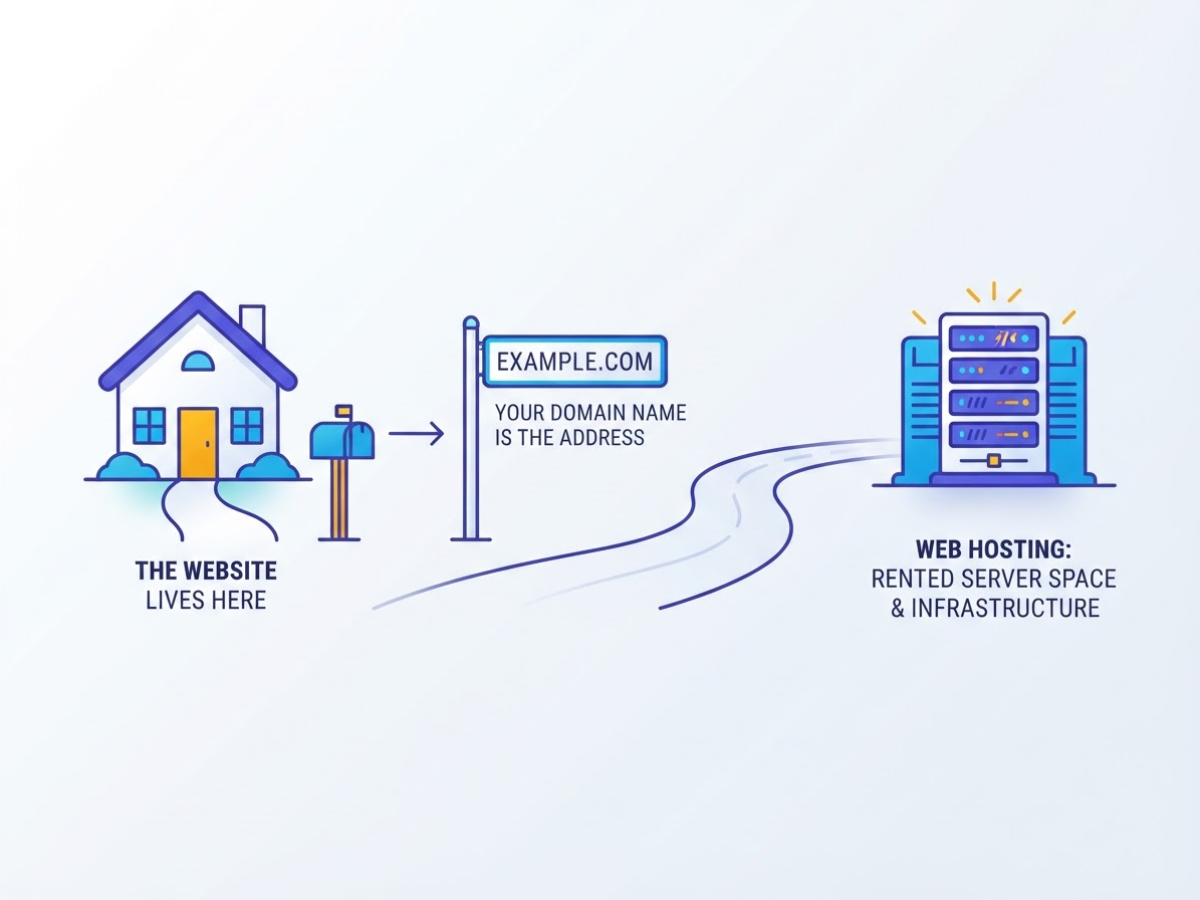
When I explain this to a new website owner, I use one simple picture: your domain name is the address, while web hosting is the place where the website lives. The comparison helps, but it leaves out DNS, servers, and IP addresses.
A domain name is the human-readable address people type, such as example.com. DNS translates that name into the IP address of the server holding your site, so visitors do not have to remember a string of numbers. A domain points users toward a web server identified by an IP address.
Hosting is rented server space and the infrastructure that stores your website’s files, including HTML, images, videos, databases, and code. When someone visits your domain, the hosting server sends those files to the visitor’s browser. Web hosting stores website files on servers and makes them accessible across devices.
| Service | What it does | What happens without it |
|---|---|---|
| Domain registration | Reserves your chosen web address for a set period | Visitors have no memorable address to type |
| DNS management | Tells the domain which server or service to use | The address cannot find the right destination |
| Web hosting | Stores and delivers your website files | The domain opens nothing useful |
The house analogy makes the gap obvious: the domain is the street address, and hosting is the property or building. Buying only the address does not build a house. Likewise, buying a domain alone does not publish a website. You can own myshop.in while it shows a parking page, an error, or nothing at all.
These services can come from separate companies. You might register the domain with one provider, manage DNS somewhere else, and host the site with a third provider. That arrangement works, although changing DNS records is a common beginner headache. Providers such as DomainAdda may bundle everything, just as web hosting services in Pune may be sold as part of a broader package, but the underlying services remain separate.
Pro Tip: Check whether an advertised price covers registration, renewal, hosting, or only an introductory term.
The cost becomes easier to judge once you match each purchase to what you are actually putting online.
Do You Need a Domain, Hosting, or Both?
Your first purchase depends on what you are trying to put online. I have seen beginners buy hosting for a domain they only wanted to reserve, then pay for features they never used. Use this quick match-up:
| Your immediate goal | What you need |
|---|---|
| Business website | Domain and hosting |
| Blog | Domain and hosting, unless you are testing on a free platform |
| Portfolio | Domain and hosting, or a hosted portfolio service first |
| One-page landing page | Hosting and usually a domain; a temporary URL works during setup |
| Online store | Domain and hosting that supports your store platform, payments, and product images |
| Custom business email | A domain plus separate mailbox or email-hosting service |
A domain can be registered months before your site is ready. It reserves the name, but it does not display a homepage by itself. A domain is a human-readable address that DNS points toward a server, while hosting stores the site files visitors load, as MDN explains. You can register the domain with one company and host the site elsewhere by changing its DNS settings.
Most hosting accounts give you a temporary URL, such as a provider subdomain, while you build. That works for checking a theme or sending a draft to a designer. It looks unfinished on a business card, though, and customers generally trust yourbrand.com more than a long address containing a host’s name.
Email causes another common mistake. Ordinary website hosting sometimes includes mailboxes, but plans differ on storage, spam filtering, mobile sync, and support. If you need hello@yourbrand.com, confirm the mailbox terms or choose a dedicated service such as Google Workspace email hosting.
Pro Tip: Register the preferred brand domain before building the site, but compare renewal pricing before committing to a multi-year budget.
For most beginners, buy the domain early, then choose hosting after comparing the platform, expected traffic, storage, support, and monthly budget. This web host selection checklist helps you avoid choosing on price alone. The next question is how to make the two services work together.
How to Connect a Domain to Web Hosting
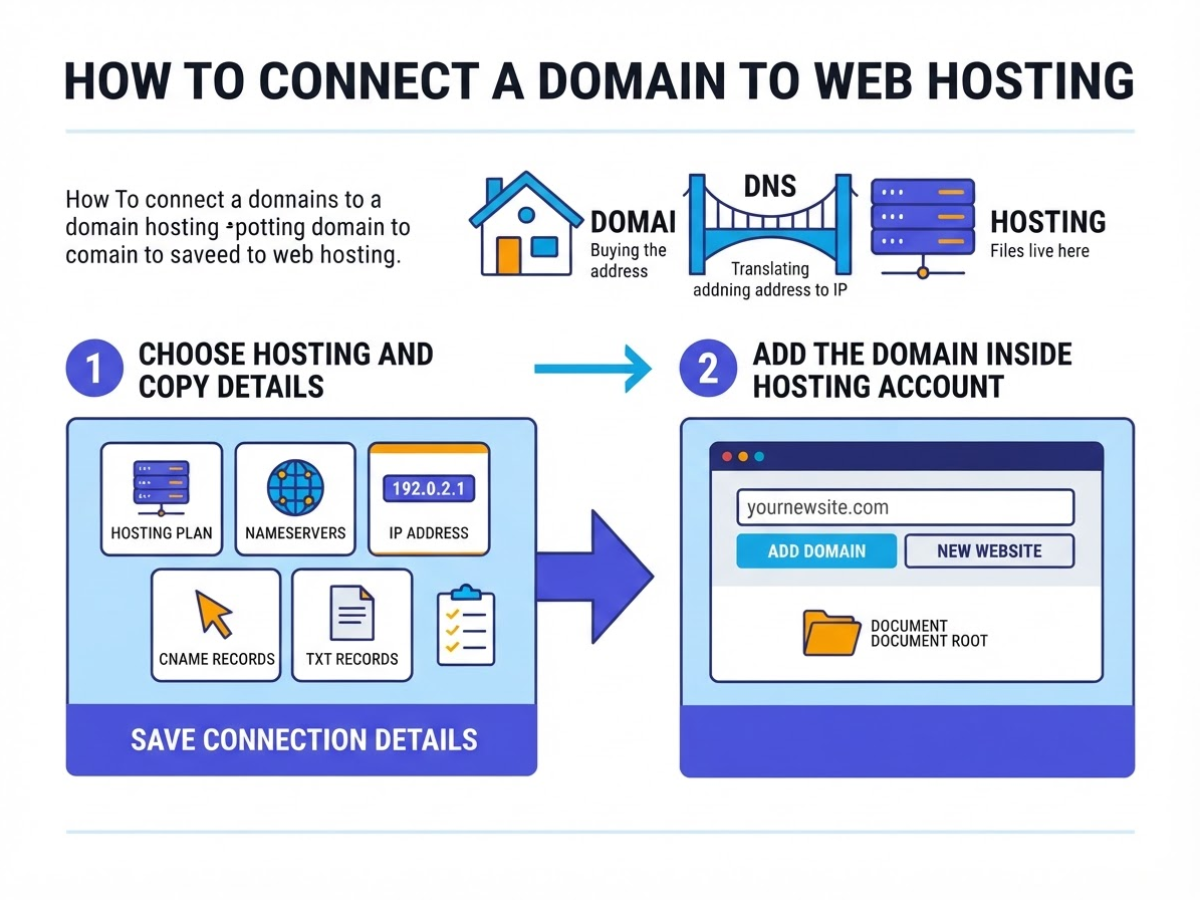
I connect domains for new sites often, and the mistake I see most is treating the purchase as the finish line. Buying the domain gives you the address; hosting gives your files somewhere to live. DNS is the bridge between them, translating the domain into the server’s IP address.
- Choose hosting and copy the connection details. Pick a plan that matches your site, then save the host’s nameservers, IP address, and required CNAME or TXT records. If you are still comparing plans, review what to look for in a web host before paying. Do not rely on an open browser tab for these details.
- Add the domain inside your hosting account. Open the control panel, choose “Add domain” or “New website,” and enter the exact domain, usually without
https://. Check the document root or installation destination. A common failure is installing WordPress in/public_html/example.comwhile the domain points to/public_html, leaving visitors with a blank page or directory listing. - Point DNS to the host. If the host supplies nameservers, replace the registrar’s existing nameservers with both values, such as
ns1.examplehost.comandns2.examplehost.com. If you manage DNS elsewhere, keep the nameservers unchanged and edit the records instead: an A record for the root domain, a CNAME forwww, and any MX, TXT, or verification records your email and services require. A domain and hosting can come from different providers because DNS can point to the hosting infrastructure.
Pro Tip: Take a screenshot or export existing DNS records before changing nameservers so email and verification records can be restored if needed.
- Allow DNS time to update, then verify it. Some networks show the new destination within minutes; others keep the old result for several hours because of cached DNS data. That delay is normal. Check the A record, nameservers, and
wwwrecord with a DNS checker, then test from mobile data as well as your home connection. - Finish the site and test the real address. Install WordPress or your chosen platform, upload files to the correct document root, and enable HTTPS through your host. Open both the root domain and
wwwversion on desktop and mobile. Test the homepage, navigation, contact form, images, redirects, and email before sharing the URL.
If it still fails, check nameserver spelling, confirm that the required A or CNAME record exists, make sure the domain has not expired, and compare the hosting path with the folder containing index.html or index.php. Also check whether an old DNS provider still controls the zone. With the connection clear, you can compare bundled and separate setups.
Domain and Hosting: Buy Together or Separately?
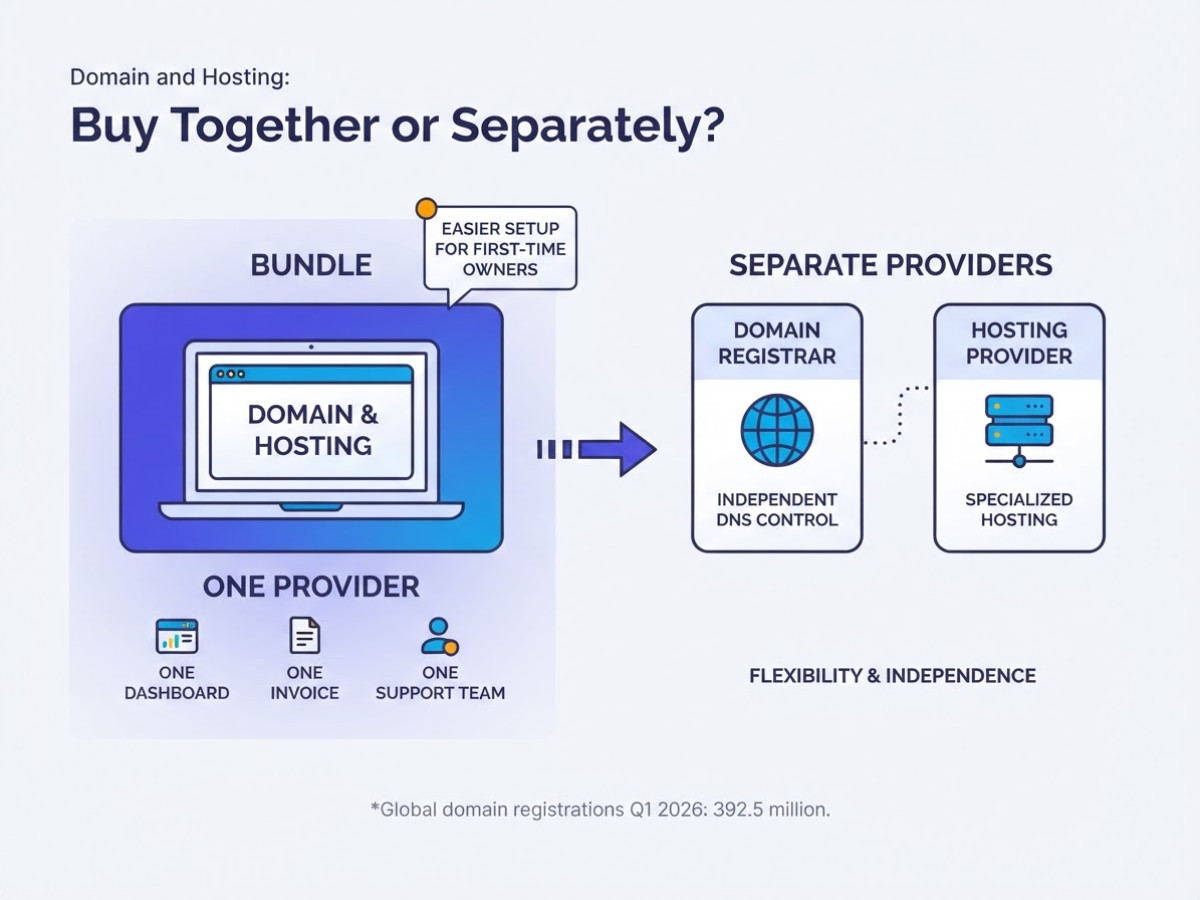
When I set up sites for first-time owners, buying the domain and hosting from one company usually removes two annoying tasks: matching accounts and figuring out where DNS records belong. One dashboard, one invoice, and one support team feel simpler while you are learning what an A record or nameserver does. The catch is that the introductory bundle price can look much better than the renewal bill.
Separate providers are not automatically harder. A domain can point to hosting elsewhere through DNS, so you can register the name with one company and place the site on another provider’s servers without changing the public URL. I prefer this arrangement when a client needs specialist hosting, independent DNS control, or room to change vendors without transferring everything at once.
| Factor | Same provider | Separate providers |
|---|---|---|
| Setup | Faster for beginners; defaults often connect automatically | Requires nameserver or DNS changes |
| Billing | One account and renewal date | More invoices and separate renewal reminders |
| Support | One team may investigate the whole setup | Each provider may blame the other first |
| Flexibility | Convenient, but services become linked | Easier to choose specialist hosting or change vendors |
| Cost | Bundles can lower the first-year price | Lets you compare renewal prices independently |
Performance does not drop just because providers differ. DNS configuration and hosting quality matter more: a wrong record can make the site unreachable, while crowded hosting can slow it down. The real frustration is support ownership. If email stops working after a DNS change, you may spend time proving whether the registrar or host controls the broken record.
Before buying, ask for the renewal price, backup schedule, SSL coverage, email limits, control panel, migration assistance, uptime commitment, and storage, CPU, bandwidth, and database limits. Check whether backups are restorable, not merely advertised, and whether migration help costs extra. This web host checklist covers questions sales pages tend to bury.
Choose one provider for low friction, not because bundling is technically required. Choose separate providers when control and future vendor changes matter more than one convenient login. The final choice still needs a launch check.
What to Check Before You Launch
The purchase is not finished when the checkout page says “success.” I have seen small businesses lose a working site because the domain expired while the hosting account remained active and billed. Domain registration and hosting renewal are separate services, so check both expiry dates, turn on auto-renewal where appropriate, and save a payment method that will not expire next month.
Before changing nameservers, copy the existing DNS records. A nameserver change can break more than the website. It can interrupt email, subdomains such as shop.example.com, Google verification records, analytics tools, payment services, and other systems that depend on DNS. Keep the old records available and make the change during a quiet period.
Use this pre-launch mistake list as a hard checkpoint:
- Buying hosting without confirming storage, bandwidth, CPU, RAM, inode, database, and email limits.
- Assuming “backup included” means you can restore the site yourself. Check frequency, retention, download access, and the actual restoration process.
- Ignoring malware scanning, firewall coverage, SSL renewal, and support channels after business hours.
- Treating a low introductory price as the long-term cost. Record renewal pricing, add-on charges, migration fees, and mailbox limits.
- Giving a designer or agency the only registrar login, or registering the domain with their email address instead of yours.
I check performance before launch, not after visitors complain. Google’s under-200-millisecond server response target is a useful aim, not a guarantee on every page. For user experience, use the Core Web Vitals targets of LCP under 2.5 seconds, INP under 200 milliseconds, and CLS under 0.1, while remembering that images, plugins, scripts, and mobile networks affect the result.
Run a real browser test on www and the non-www address. Confirm HTTPS redirects, navigation, contact forms, confirmation emails, mobile layouts, login pages, and every checkout or payment step. Do not test only while logged in as an administrator.
Finally, keep the domain in an account you control, with your own recovery email and two-factor authentication. For many ICANN-regulated domains, transfer to another registrar generally becomes available 60 days after initial registration, so note that timing before you need to move. These checks leave you with a setup you can actually manage.
My honest take on web hosting vs domain name
I have seen beginners treat a domain name and web hosting as competing purchases. They are not. Your domain is the address people type, while hosting is the rented server space that stores your website. Asking which one is “better” misses the practical decision.
My contrarian advice is simple: do not automatically buy every add-on in a hosting bundle. Before paying, confirm which website platform you will use, how much traffic you expect, whether you need business email, how backups work, and what the renewal price will be. A cheap first-year package can become an expensive habit when renewal notices arrive, and some backup promises are less useful than customers assume.
For a local business launching a five-page WordPress site, I would usually start with one domain and an appropriately sized shared hosting plan. You probably do not need a virtual server, premium security bundle, or several mailboxes on day one. Shared hosting has limits, but it is often enough for a new site with modest traffic.
A single provider can still be practical when you want one bill and one support contact. I would only do that after confirming that you control the domain account, can access DNS settings, and can move the site to another host later. No provider alone guarantees rankings, speed, or uptime.
- My expectation: shared hosting is a sensible starting point, not a permanent answer for every store or high-traffic application.
— AVM Cloud Content Strategy Team
Ready to connect your domain and hosting?
If you are still mixing up a domain with hosting, keep the next step practical: register a name that fits your business, then choose hosting based on the site you will actually run. A small brochure site does not need the same resources as an online store with daily traffic and email accounts.
AVM Cloud, through the DomainAdda service, gives you a practical place to handle both domain registration and hosting. Before checkout, review renewal prices, resource limits, backups, SSL coverage, and whether the plan supports the email addresses you need. These details are easy to skip and irritating to fix later.
You can compare the available hosting options and use this hosting selection guide to narrow the choice. After purchase, follow the setup guidance or contact support if connecting DNS becomes the frustrating part.
Frequently Asked Questions
Can I buy a domain name without buying hosting?
Yes. You can register a domain and keep it unused without paying for hosting, but it will not display your website files until you connect it to hosting or a platform such as a site builder. This is useful if you want to secure a name months before launching.
How long does it take for a domain to work after changing nameservers?
Nameserver changes often start appearing within a few hours, but some DNS caches take up to 48 hours to refresh. Check the domain from at least 2 different networks, and avoid changing the settings repeatedly because that makes troubleshooting harder.
Can I use one domain name for multiple websites?
Yes, but you usually need separate subdomains, such as shop.example.com and blog.example.com, or different paths managed by your hosting setup. One domain can support several sites, although separate domains are often less confusing when each site has its own brand, team, or billing account.
Does changing web hosting affect my domain name?
No. You can keep the same domain and point it to the new host by updating its DNS records, but plan the migration before making the change to reduce downtime. Lowering the DNS TTL to around 300 seconds before migration can help the update spread faster, although cached records still delay access for some visitors.
What happens if my domain registration expires?
The domain can stop resolving to your website on the expiration date, and the registrar can later place it into a recovery period or delete it, depending on the extension and registrar rules. Turn on at least 2 renewal reminders and keep your payment details current, because recovery fees can be much higher than the original registration price.
Recommended reads
- What To Look For In A Web Host Check These 7 Tips
- Domainadda Hosting Review Everything You Need To Know
- Shared Vs Vps Hosting Know Which Is The Best Option
- Google Workspace Email Hosting Setup Guide
Sources
- What is a Domain Name? – Learn web development | MDN
- What is Web Hosting? – Web Hosting Service Explained – AWS
- DNS concepts · Cloudflare DNS docs
- Changing Your Web Hosting and SEO | Google Search Central
- Domains · Cloudflare Fundamentals docs
- FAQs – ICANN
- DNIB.com Reports Internet Has 392.5 Million Domain Name Registrations at the End of the First Quarter of 2026
- Improve Server Response Time | PageSpeed Insights | Google for Developers
- Understanding Core Web Vitals and Google search results | Google Search Central