

Buy Cheap Domain : India Buying Guide
TL;DR: “Buy cheap domain 99” usually means you’re looking for a ₹99 introductory domain deal, but check the renewal price, extension, taxes, and add-ons before paying. Compare the total cost for year 1 and year 2, choose between
.inand.combased on your audience, and review every checkout and auto-renewal setting to avoid a poor domain choice or an unexpected bill.
A ₹99 domain can look like a bargain until the first renewal invoice arrives. The extension, taxes, missing privacy or DNS features, and transfer restrictions can change the real cost, and that fine print is easy to miss at checkout. The .IN Registry lists ₹500 as the wholesale price for a second-level .IN domain and lets registrars set their own retail prices, so advertised offers can vary sharply. This guide gives you a practical buying checklist, walks through checkout, and compares low-cost .in and .com options available through DomainAdda, including first-year pricing, renewals, inclusions, taxes, and transfer rules.
| Point | Details |
|---|---|
| Check renewal pricing | Compare the second-year price before buying because a ₹99 first-year offer may increase sharply at renewal. |
| Choose the extension | Pick .in for an India-focused business, while .com usually feels more familiar to international visitors. |
| Review the cart | Confirm the 1-year term, taxes, add-ons, DNS access, and auto-renewal settings before payment. |
| Protect your name | Choose a memorable, brand-safe domain instead of forcing keywords into the name for a small SEO gain. |
| Plan for ownership | Keep account access and registrant details accurate, and note that .IN transfers are restricted during the first 60 days. |
What “Buy Cheap Domain 99” Really Means
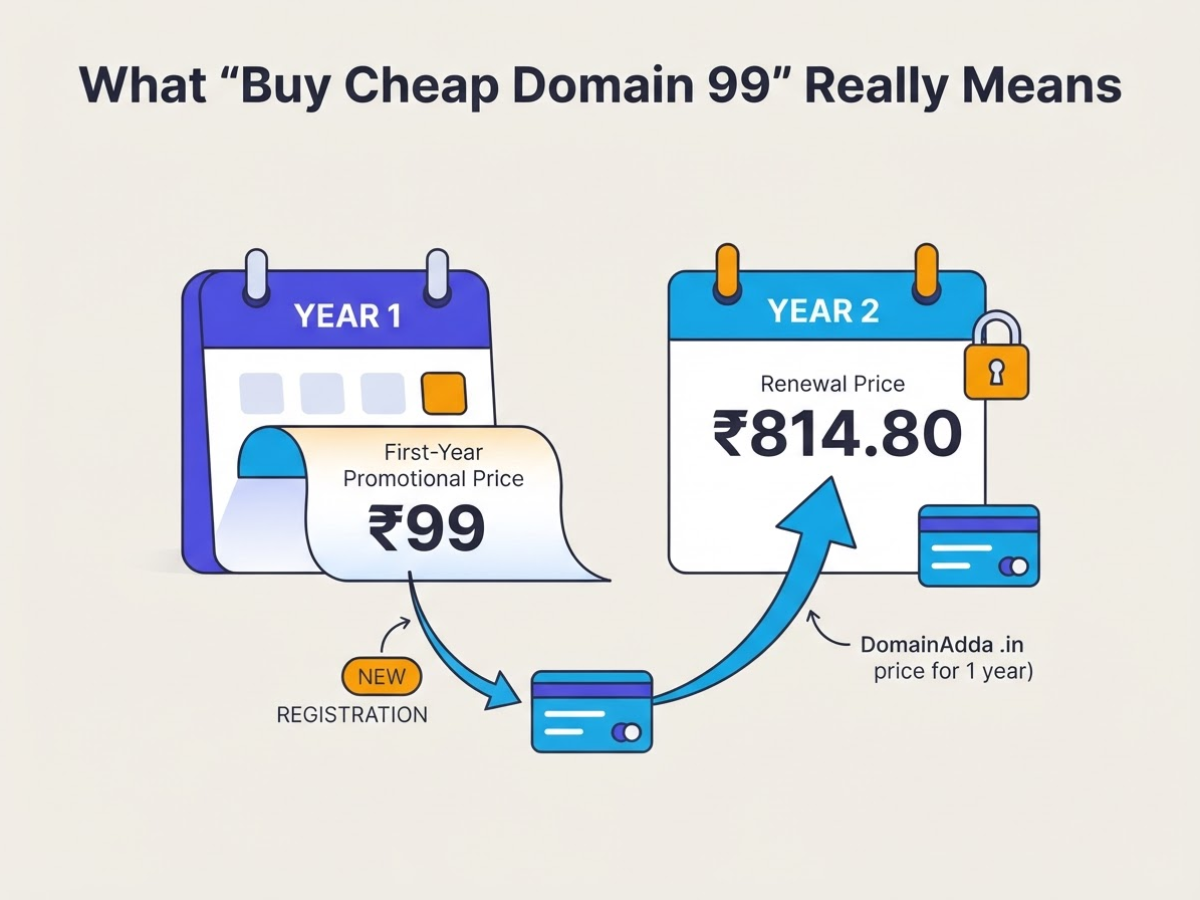
When someone searches for “buy cheap domain 99,” they usually want a domain for roughly ₹99, not a lesson in registry pricing. In practice, that ₹99 figure is usually a first-year promotional price. It may apply only to a selected extension, a new registration, or a specific checkout condition. The standard price for year two can be much higher, so the headline is a starting point, not the full ownership cost.
Here is the pricing distinction that causes most unpleasant surprises:
| Price label | What it usually means |
|---|---|
| First-year promotional price | A discounted rate for the initial registration period |
| Standard registration price | The normal price for registering a domain without the promotion |
| Renewal price | The amount charged when you keep the domain for another year |
Prices change according to the extension, registrar, registration term, taxes, and extras such as privacy protection or premium DNS. A three-year purchase may show a different total from a one-year purchase, while a desirable name can cost far more because it is classified as premium. Availability also changes minute by minute. That is the annoying part: a name can appear in a search result and disappear before you finish payment.
For a transparent comparison, DomainAdda’s current cart lists one-year .in registration, transfer, and renewal at Rs.814.80, while the same one-year .com options are Rs.1,282.80. Those figures show why “₹99” should not be treated as a general price for every domain ending. Your final amount may also include applicable taxes.
Pro Tip: Search the exact domain at checkout in both .in and .com before deciding, because the cheapest extension may not be the best fit for the audience.
A domain is only the address. It does not automatically include web hosting, a business email inbox, an SSL certificate, or a website builder. Hosting stores your website files, whereas the domain points visitors to that service. Review the difference between web hosting and a domain name before adding services you do not need.
Before you pay, confirm the name is available, check the first-year and renewal rates, select the correct term, and inspect the tax-inclusive checkout total. Next, we’ll look at which domain extensions make sense for your business or project.
Should You Choose .in, .com, or Another Extension?
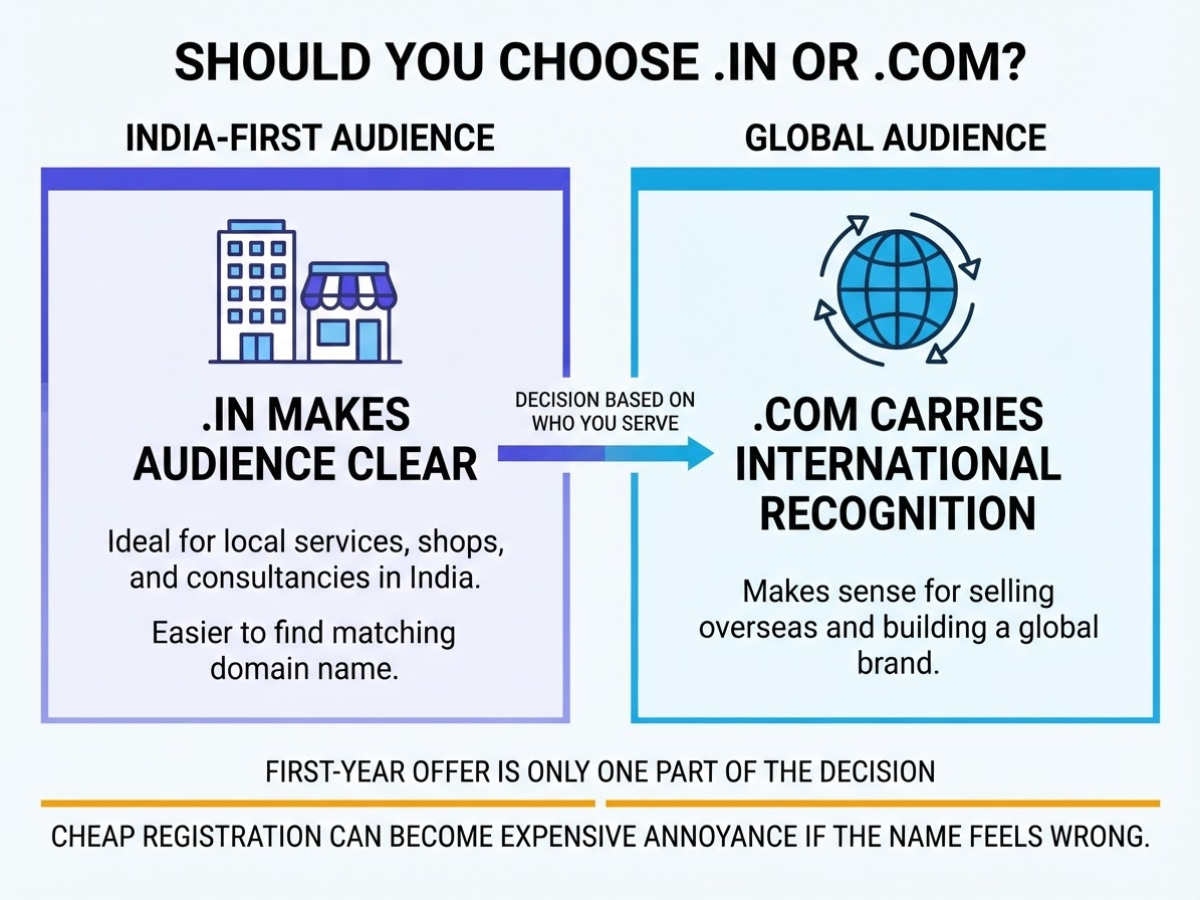
The extension you choose tells visitors who you expect to serve. When I review domain options for small businesses, I treat the first-year offer as only one part of the decision. A cheap registration can become an expensive annoyance if the name feels wrong every time you say it aloud or print it on an invoice.
For an India-first shop, consultancy, or local service, .in usually makes the audience clear. It can also be easier to find than the matching .com. A .com still carries broader international recognition, so it makes more sense when you plan to sell overseas, publish for a global audience, or build a brand that should not sound tied to one country.
The .IN Registry permits unrestricted .IN registration worldwide, subject to availability and reserved or restricted names. You do not need to live in India to register one. The registry also supports second-level .in and third-level zones such as .co.in, although I generally prefer the shorter .in when the name is available.
| Decision factor | Choose .in when… |
Choose .com or another extension when… |
|---|---|---|
| Audience location | Most customers are in India | You serve several countries or target international buyers |
| Brand intent | You want an India-first identity | You want a neutral, globally familiar address |
| Availability | The clean brand name is available in .in |
The .com is available and fits your long-term plan |
| Renewal expectations | You have checked the registrar’s renewal price, not just the offer | You accept a potentially higher renewal cost for wider recognition |
Do not confuse registry pricing with your checkout total. The published .IN wholesale tariff lists ₹500 for second-level .in and ₹400 for third-level zones, but registrars set their own retail prices for registration and renewal. Promotions can make a first year look like ₹99, while renewal may follow a different rate. Check both before paying, and include taxes if the checkout adds them.
Pro Tip: If the .com is unavailable or costly, a clear .in domain can be stronger for an India-first business than an awkwardly modified .com.
Secure the preferred brand name before adding numbers, extra words, or hyphens. freshbakes.in is easier to remember than fresh-bakes-24.com, even if the latter appears cheaper today. Also review the difference between a web host and a domain name so you do not mistake a domain promotion for a complete website package.
Once the extension fits your audience, compare the registrar’s renewal terms and checkout price before you register.
How to Buy a Cheap Domain Without Missing the Fine Print

Start with the name, not the discount banner. In client setups, the cheapest domain becomes expensive when nobody can spell it, the matching social handle is unavailable, or the name resembles a registered brand. I prefer a short, pronounceable name with no unnecessary hyphens, numbers, or trademark risk.
- Brainstorm and screen the name. Write down three to five options, then say each one aloud and ask someone to type it from memory. Check matching handles on the social platforms you will actually use. A perfect match is not essential, but an obviously unrelated handle can confuse customers. Search existing businesses and trademarks before you pay, especially if the name will represent a company.
- Search both extensions. Enter your preferred name with
.inand.com, rather than assuming one extension is cheaper. DomainAdda’s cart currently lists one-year.inregistration, transfer, and renewal at ₹814.80, while.comshows ₹1,282.80 for each of those one-year prices. Compare the first-year price with the renewal price, because the promotional rate is often the number that gets your attention. - Choose the registration term. An unrestricted
.INdomain can be registered for one to ten years. One year keeps your initial bill lower; several years reduce the chance that you forget renewal. I usually choose one year for an experiment and two or more years for a business that already has customers. - Inspect the cart line by line. Confirm the domain name, term, taxes, and final total. Remove add-ons you do not need, such as an unnecessary website package or privacy option. Check whether the plan includes DNS management, and find the auto-renewal switch before payment. A low headline price is not useful if the cart quietly adds services or makes renewal difficult to control.
Pro Tip: Take a screenshot of the checkout price and renewal terms before payment so you can compare the confirmation email with the advertised offer.
- Create the account carefully. Use your real name, phone number, and business details where requested. Keep access to the administrative email because verification notices, transfer requests, and renewal reminders may go there. Losing that inbox is one of the most annoying problems to fix later.
- Pay and test access. Complete payment, save the receipt, and wait for the order confirmation. Sign in again and confirm that the domain appears in your management dashboard. Open its DNS controls too, even if you are not ready to build the site. This prevents a frustrating surprise when you later connect hosting, since a domain and hosting account are separate services, as explained in the difference between web hosting and a domain name.
Once the purchase is visible and controllable, you can move on to connecting the domain to hosting and publishing your site.
Who Benefits Most From a Low-Cost Domain?
A low-cost domain makes sense when you need a credible web address before you know exactly where the project will go. I have seen freelancers use one for a portfolio, students reserve a name for a final-year project, and creators test a newsletter or podcast without committing to a full business setup.
These buyers usually get the most value:
| User | When a cheap domain fits |
|---|---|
| Freelancer | Portfolio, personal brand, or client landing page |
| Student | Project site, CV, or early startup experiment |
| Local shop | Basic menu, map, contact details, or seasonal offer |
| Creator | Newsletter, video channel, course, or community page |
| Startup | Testing a name before paying for branding and ads |
| Campaign team | A temporary event, product launch, or election page |
The main advantage is validation. You can put a name on a landing page, collect enquiries, and see whether people remember or type it correctly before buying hosting, commissioning a logo, or running paid marketing. A domain is not a website, though. Web hosting and a domain name serve different jobs, and hosting, email, design, security, payment tools, and advertising can cost far more than registration.
A cheap option becomes a poor choice when the name represents a serious company, regulated service, or established product. In those cases, prioritise a matching business email, a clean spelling, and protection against competitors. Buying the main name plus relevant extensions can prevent confusion, especially if customers may search for both .in and .com. The .IN Registry permits worldwide registration in unrestricted .IN zones, subject to availability and reserved names, so a .in address can suit an India-focused idea without requiring a physical Indian office.
You can register the domain before the website is ready. That is often sensible, but set renewal reminders and keep payment details current. Losing a name because you forgot an annual renewal is a cheap purchase turned into an expensive nuisance.
The right next step is checking the renewal terms and total setup cost, not just the first-year price.
Five Mistakes That Make a Cheap Domain Expensive
The ₹99 offer is only a bargain if the domain stays affordable and usable after checkout. When I review domain purchases, the same avoidable problems appear again and again:
- Checking only the first-year price: A cheap registration can become expensive at renewal. Compare the new, renewal, transfer, and restore prices before you pay. For example, DomainAdda currently lists one-year .in registration, transfer, and renewal at ₹814.80, while .com is ₹1,282.80 for each of those services. Treat the renewal figure as the real cost, not the banner price.
- Picking a difficult or risky name: Extra hyphens, repeated letters, and unusual spellings create support headaches. Customers mistype them, then land on someone else’s website. Also search the name and check for existing trademarks before registering. A domain keyword is not a shortcut to rankings. Google says keywords in a domain name should not be chosen primarily for SEO, so choose a name people can remember and trust first.
- Adding every extra product: Registrars may offer privacy, email, SSL, and hosting during checkout. Some are useful, but buying all four without checking your plan can turn a ₹99 purchase into a recurring bill. Confirm what your hosting package includes. A domain is not the same thing as hosting, and this comparison of web hosting and domain names explains the distinction clearly.
- Using throwaway contact details: A fake phone number or an old email address can leave you unable to approve transfers or recover the account. Use an inbox you control, keep the password safe, and update the registrant details when your business changes. Registration data also has rules around collection and retention under ICANN’s Registration Data Policy.
- Forgetting renewal and transfer rules: Turn on auto-renewal, add the expiry date to two calendars, and keep a working payment method. For .IN domains, registrar-to-registrar transfers are blocked for the first 60 days after creation under the .IN Registry’s policies. Losing access during that window is particularly frustrating because you cannot solve it by moving the domain elsewhere.
Check these details before chasing the lowest advertised price, then compare the ownership terms you will live with after registration.
What to Do After You Buy the Domain
A paid domain is still only a name until visitors can reach the right place. After helping customers set up domains, I’ve found that the first hour matters more than the checkout discount, especially when a forgotten renewal email or incorrect DNS record causes trouble later.
Use this short setup timeline:
- Within 10 minutes, verify ownership. Open the registrar dashboard and confirm the registrant name, email address, phone number, and postal details. Click the verification email if one arrives. Also check that two-factor authentication is enabled and that the account email is one you can recover. An incorrect contact address can turn a simple ownership check into a support delay.
- Within the first day, choose the destination. Decide whether the domain should open a hosted website, a temporary landing page, an online store, or another service. Domain registration and hosting are separate jobs, so review the difference between a web hosting service and a domain name before changing anything.
Ask the destination provider for the exact records it needs, such as nameservers, an A record, a CNAME, or MX records. Do not copy a random DNS value from a tutorial. Remove conflicting records only after you know what they support, because one wrong change can take down a website or stop email delivery for several hours.
- Within 24 to 48 hours, secure the site. Enable HTTPS through your hosting panel or connected website platform, then test both
http://andhttps://versions. Google described HTTPS as a lightweight ranking signal affecting fewer than 1% of global queries when it introduced the signal, so treat it primarily as a security and visitor-confidence requirement, not a shortcut to rankings. The domain alone will not improve search visibility. - Within the first week, make the brand usable. If the domain represents a business, create an address such as
hello@yourdomain.comrather than relying only on a personal inbox. Finally, record the renewal date, transfer eligibility, account recovery codes, and billing details in a secure place.
Success means you control the domain, visitors reach a working destination, and customers see a credible brand. The lowest first-year price is only one part of that result. Next, compare the ongoing costs that determine whether the bargain remains a bargain.
My honest take on buying a ₹99 domain
I treat “buy cheap domain 99” as a price-checking prompt, not proof that one registrar will cost less overall. A ₹99 first-year offer can look attractive until you add renewal pricing, GST, DNS limitations, support quality, and the hassle of moving the domain later. I compare those details before I recommend a registrar or name.
My contrarian view is simple: paying more for a clean, memorable .in or .com name can be better value than choosing an awkward, heavily modified domain just to preserve a headline discount. A business that serves Indian customers should take .in seriously. It often makes the audience and location clear, while a clumsy extra word, hyphen, or number can create mistakes every time someone hears the address.
I also treat renewal ownership as part of the purchase. Use accurate contact details, keep the account email reachable, and set a calendar reminder well before the renewal date. Losing access because an old email address stopped working is a more expensive mistake than saving a small amount upfront. My practical recommendation is to buy the name that remains affordable, recognizable, and manageable after year one, not merely the cheapest option at checkout.
— AVM Cloud Content Strategy Team
Find and manage an affordable domain with DomainAdda
If you are ready to search and buy your preferred domain name, use DomainAdda to compare the available .in and .com versions before choosing one. I have seen customers rush toward the first cheap result, then notice that the better name was available under a different extension. Check the full cart before paying, not just the headline domain price.
A domain is more useful when it leads to a working site and a proper business inbox. If you need the next piece, review this guide to choosing affordable hosting for your website. Hosting and email add cost, so compare them rather than adding extras automatically. At checkout, verify the renewal price, taxes, and any optional services. You stay in control of the final amount.
Frequently Asked Questions
Is it really possible to buy a domain for ₹99?
Yes, some registrars advertise a ₹99 first-year offer, usually for selected extensions and new registrations. Check the full checkout total, including taxes and add-ons, and compare the second-year renewal price before you pay.
Which domain extension is cheapest in India?
There is no permanent cheapest extension because registrar discounts change, but a .IN domain may cost less than a .COM domain during some promotions. Compare at least 3 options and check both the first-year price and renewal charge.
Do domain names renew at the same price as the first year?
No, a ₹99 introductory price can increase substantially when the domain renews after 12 months. Read the renewal line in your cart, then set a reminder at least 30 days before the expiry date.
Can I buy a domain name permanently?
No, domain names are registered for fixed periods and must be renewed to remain yours. An unrestricted .IN domain can generally be registered for 1 to 10 years at a time, but no registration lasts forever.
Can I use a domain before building a website?
Yes, you can reserve the name, point it to a temporary landing page, or create a professional email address before your website is ready. For a complete website, you will still need hosting or another destination service, and email setup may take 24 to 48 hours to update.
Recommended reads
- Web Hosting Vs Domain Name The Difference
- Cheap Indian Hosting A Practical Buying Guide
- Difference Between Com And Org Which To Choose
- How To Host A Website Step By Step Guide
Sources
- Shopping Cart – DomainAdda
- Tariff
- policies
- DNIB.com Reports Internet Has 386.9 Million Domain Name Registrations at the End of the Fourth Quarter of 2025
- SEO Starter Guide: The Basics | Google Search Central
- HTTPS as a ranking signal | Google Search Central Blog
- ICANN Publishes Registration Data Policy