

Email Hosting Service for Business: Setup Guide
TL;DR: An email hosting service for business gives you a custom-domain address, role-based mailboxes such as
sales@andsupport@, and more control than free personal email. Compare providers on storage and security, confirm the 3 key DNS authentication records are configured correctly, and check the renewal price before you commit.
A free personal inbox can get you through a busy week, but an address such as you@yourcompany.com immediately feels more credible to clients. I have seen small businesses lose trust when proposals come from a generic account, then struggle with missed messages, confusing setup screens, and spam folders during busy periods. That matters because 55% of people surveyed in 2024 said they communicate with clients by email. This guide shows you how to define your requirements, compare hosted email options, check security and uptime, configure DNS records, test delivery, and estimate the total cost for a small business.
| Point | Details |
|---|---|
| Use a Custom Domain | A branded address such as sales@yourcompany.com supports recognition and keeps business messages separate from personal accounts. |
| Compare Total Value | Compare mailbox storage, shared storage, aliases, support, migration help, renewal pricing, and included productivity tools instead of judging a service by its monthly price alone. |
| Prioritize Authentication | Plan for SPF, DKIM, and DMARC, since Mailgun reported that 53.8% of surveyed senders used DMARC in 2024. |
| Budget Per User | Calculate the cost of every active mailbox, alias, archive, and future employee rather than pricing the service for only 1 account. |
| Test Before Switching | Check DNS propagation, sending, receiving, spam placement, mobile access, and recovery procedures before moving all business mail. |
What Is Business Email Hosting—and Who Needs It?
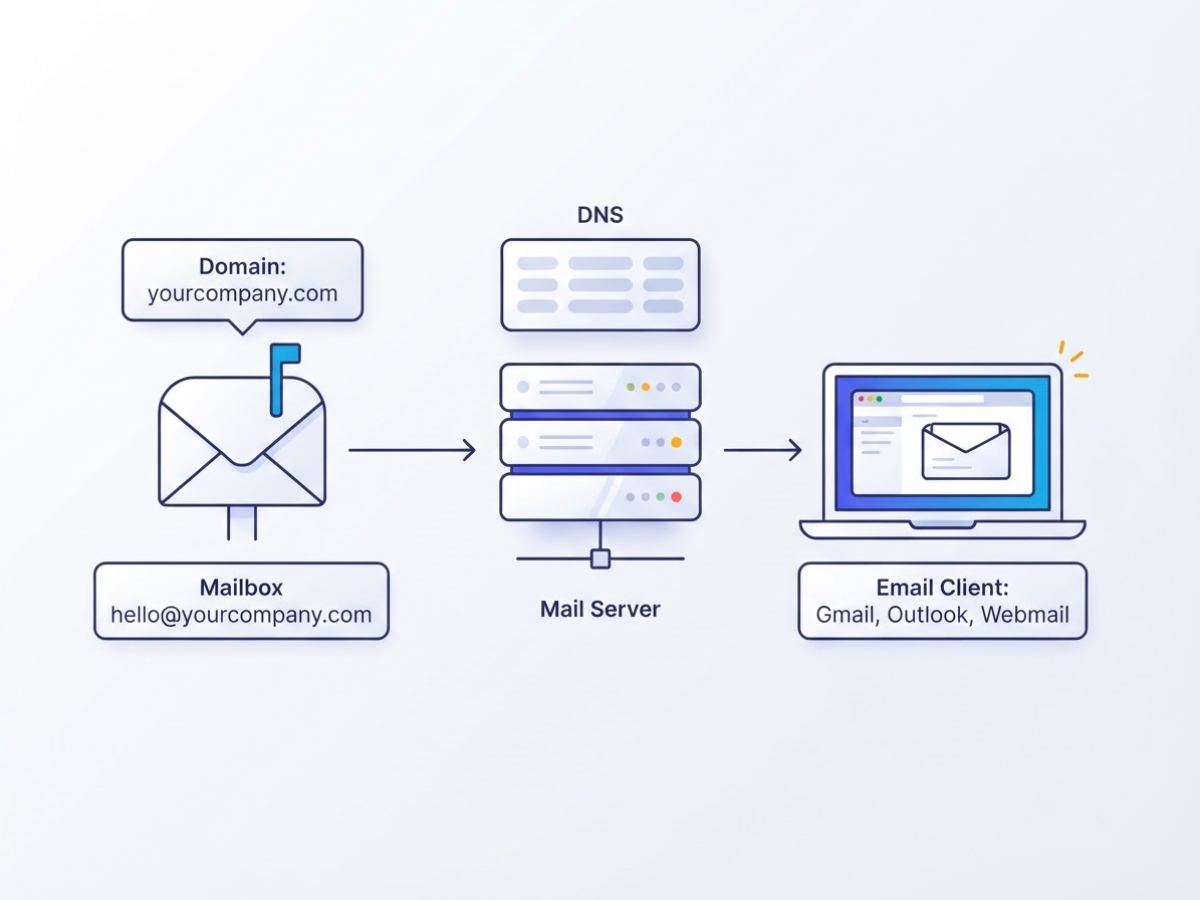
When I help a freelancer or small team set up a professional inbox, the first confusion is usually simple: buying a domain does not automatically give you a working mailbox. An email hosting service for business stores and sends messages for addresses such as hello@yourcompany.com, then gives your team a way to use them.
Here is how the pieces fit together:
| Part | What it does |
|---|---|
| Domain | Your public address, such as yourcompany.com |
| Mailbox | The account that stores messages for name@yourcompany.com |
| Mail server | The provider’s system that sends, receives, and stores mail |
| DNS | Records that tell other mail servers where to deliver messages and help verify your domain |
| Email client | Gmail, Outlook, Apple Mail, or webmail where you read and send messages |
A business plan usually includes custom-domain addresses, browser-based webmail, mobile access, aliases, spam filtering, and an admin panel. The administrator can add or remove users, reset passwords, set storage limits, and sometimes apply security rules. The setup is not always pleasant. A missing MX record can stop incoming mail, while incorrect SPF or DKIM records can send legitimate replies to spam.
Forwarding is different. It only redirects mail from one address to another, such as sales@ to your personal Gmail account. It may not give you a separate inbox, reliable sending identity, shared controls, or proper staff access. For a serious client-facing address, forwarding alone is usually a shortcut that causes trouble later. Our business email hosting setup guide covers the practical buying and setup decisions.
Web hosting runs your website files. Domain registration reserves your name. An email marketing platform sends campaigns to lists and tracks opens. None of those services, by themselves, equals a hosted business mailbox.
That matters because email still carries real client work. A 2024 survey of 402 people found that 55% communicate with clients by email. Freelancers, startups, local businesses, agencies, and growing teams need a hosted mailbox when several people must reply from a consistent domain, keep messages after an employee leaves, or separate support from personal accounts.
Pro Tip: Create role-based addresses such as support@ and billing@ with aliases where possible, so staff changes do not require changing a public-facing address.
Next, compare the main hosting options by storage, security, administration, and cost.
Match the Service to Your Team’s Real Requirements
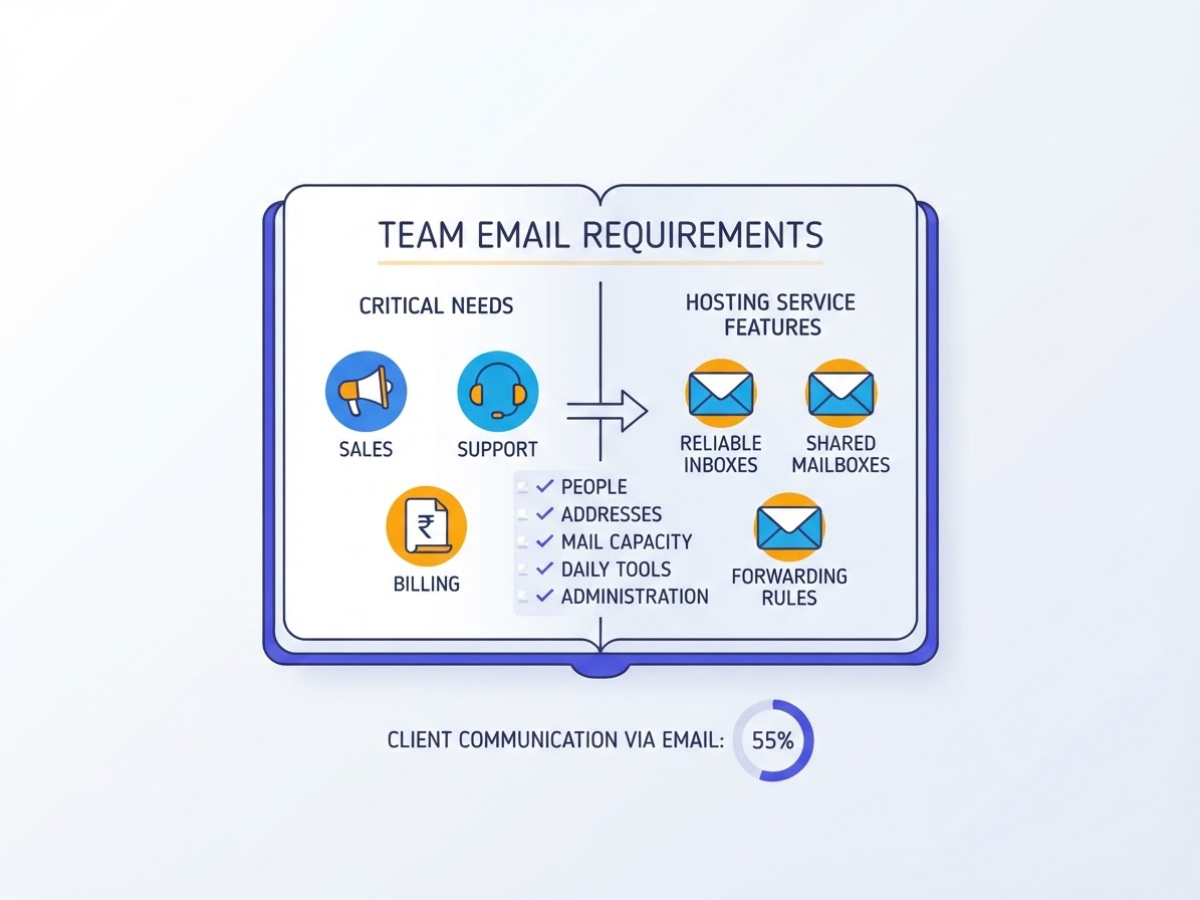
Before comparing an email hosting service for business, I write down what the team will actually use. That sounds obvious, but I have seen companies pay for video meetings and document storage when they mainly needed reliable inboxes for sales, support, and billing.
Start with this checklist:
- People: current paid users, expected hires, and departments that need separate access
- Addresses: aliases such as
sales@, shared mailboxes, forwarding rules, and catch-all addresses - Mail capacity: storage per user, attachment limits, spam filtering, and retention or archiving
- Daily tools: mobile apps, webmail, calendars, shared calendars, contacts, and search
- Administration: role-based controls, password resets, two-factor authentication, audit logs, and account suspension
- Operations: migration help, backup options, uptime commitments, support hours, and billing in INR
Pro Tip: Count shared addresses and aliases separately from paid users, because some providers include them while others treat them as additional mailboxes.
Mark each item as must have, useful, or not needed. Do not let a polished plan page turn “useful” features into mandatory purchases. For example, a five-person consultancy may need custom-domain email, mobile access, calendars, and shared info@ mail, but not 1 TB of cloud storage per employee.
A basic hosted mailbox is usually enough when your team already works in separate accounting, project, and file-sharing tools. It keeps the bill predictable and administration fairly simple. The irritation is that collaboration often means forwarding messages or copying files between systems.
Choose an integrated suite when staff need shared calendars, live documents, central contacts, large storage, or one admin console. Google Workspace Business Starter lists 30 GB of pooled storage per user, while Microsoft 365 Business Basic lists 1 TB per user. Those extras can justify the higher price, but only if your team will use them. Otherwise, you are funding unused storage.
Indian businesses should also check the practical details: INR invoices, GST documentation, support that responds during Indian working hours, migration assistance, and a control panel your office manager can understand. Before switching, use a business email hosting setup guide to map DNS, old-mail imports, and device setup.
Finally, size the plan for the next 12 to 24 months. Price 15 users if you have 10 today, and confirm whether adding accounts, aliases, or storage changes the rate. Once your shortlist fits those requirements, compare security, deliverability, and provider reliability.
Business Email Hosting Compared: Mailbox or Productivity Suite?
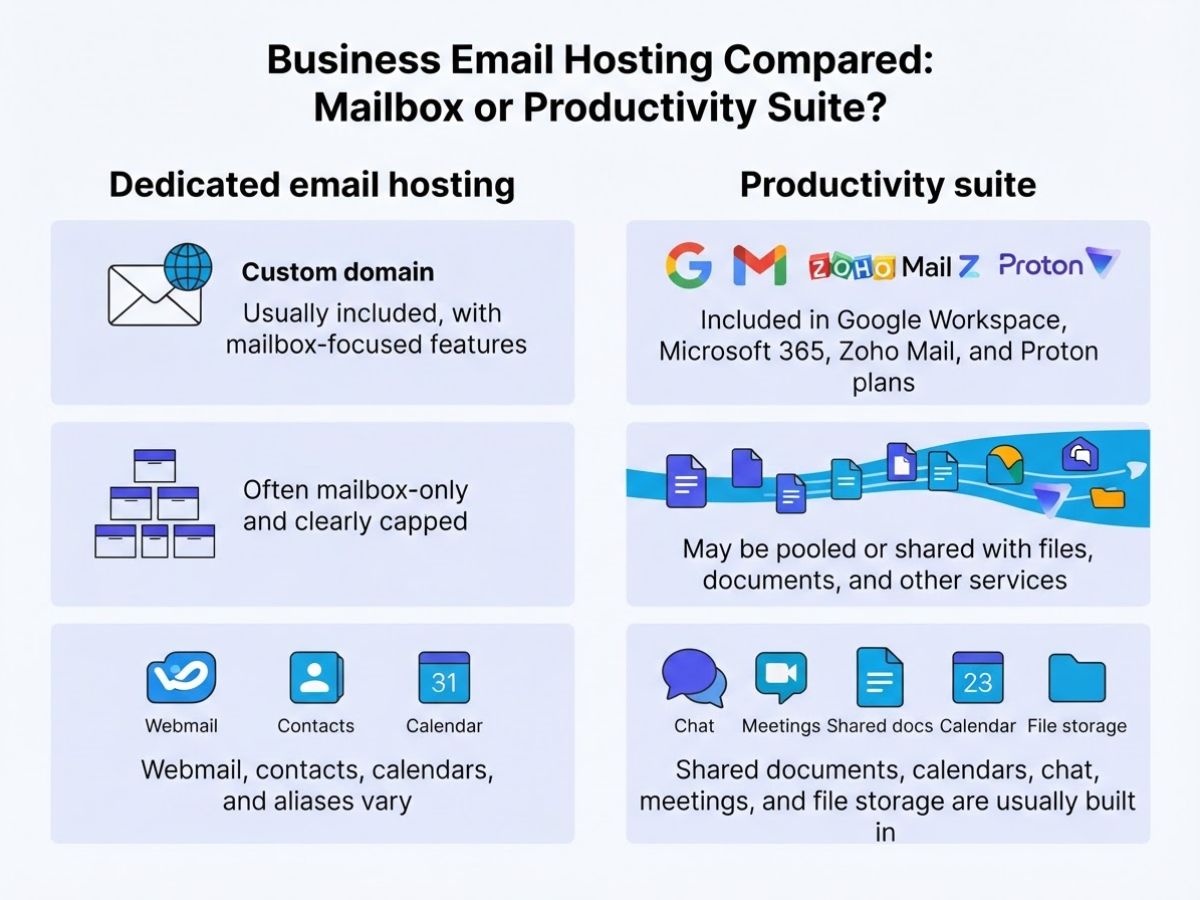
When I compare business email plans for clients, I start with a blunt question: do they need inboxes, or do they need a daily work system? A dedicated mailbox can keep costs and administration low. A suite can replace separate tools, but you may pay for storage and features your team never touches.
| Comparison point | Dedicated email hosting | Productivity suite |
|---|---|---|
| Custom domain | Usually included, with mailbox-focused features | Included in Google Workspace, Microsoft 365, Zoho Mail, and Proton plans |
| Storage | Often mailbox-only and clearly capped | May be pooled or shared with files, documents, and other services |
| Collaboration | Webmail, contacts, calendars, and aliases vary | Shared documents, calendars, chat, meetings, and file storage are usually built in |
| Security controls | SPF, DKIM, spam filtering, backups, and 2FA depend on the host | More detailed admin policies, device controls, audit logs, and retention options are common |
| Administration | Faster for a small team | More settings, policies, licenses, and user-management work |
| Support and migration | Check hands-on transfer help and mailbox limits | Check import tools, migration windows, and whether support is included |
| Price transparency | Often easier to understand per mailbox | Compare annual versus flexible billing, storage rules, and add-on charges |
The storage figures show why headline comparisons mislead. Google Workspace Business Starter includes custom business email and 30 GB of pooled storage per user, while Microsoft 365 Business Basic pairs custom email with 1 TB of cloud storage per user. That 1 TB is not simply a bigger mailbox. It also covers cloud files, so it matters more if your team already works in Microsoft 365.
Pro Tip: Do not compare storage numbers without checking whether storage is pooled, mailbox-only, or shared with documents and other services.
Zoho Mail gives you a lower-cost path with 5 GB and 10 GB Mail Lite tiers, plus a 50 GB Mail Premium tier and 50 GB of archival storage per user. Its selected-data-center free tier supports up to five users, one domain, and up to 5 GB per user, but availability restrictions can make it a poor choice if you need a predictable rollout.
Privacy-focused Proton Workspace Standard goes in the opposite direction, listing 1 TB per user and support for 15 custom email domains at $12.99 per user monthly. That capacity is attractive for teams handling sensitive mail, although the price is harder to justify if you only need basic inboxes.
Before choosing, document aliases, shared inboxes, retention, 2FA, admin roles, export options, and migration support. This business email hosting setup guide helps you check those details before moving live mail.
A dedicated host suits a team that wants simple inboxes and predictable billing. Choose a suite when shared files, calendars, meetings, or stronger policy controls will replace other subscriptions. Your workflow, budget, storage pattern, and tolerance for administration should decide the fit, not the largest number in a pricing table. Next, compare the security controls that protect those mailboxes from real business threats.
How to Set Up a Business Email Hosting Service
A clean cutover starts before you touch DNS. I have seen teams change MX records first and then discover that nobody knows the registrar login, the old provider’s export format, or which addresses still receive invoices.
- Inventory the domain and mailboxes. Confirm domain ownership, registrar access, DNS hosting, the current mail provider, and the full mailbox list. Include shared addresses such as
sales@,support@, andbilling@, plus aliases, distribution groups, and former employee accounts that still need forwarding. A short inventory prevents a missing address from becoming a support emergency. - Choose the plan and create admin access. Check storage, user limits, archive rules, support hours, and the renewal price before you buy. Create a separate administrator account with a strong password and multi-factor authentication, then add users, aliases, groups, and role-based addresses. Do not use one employee’s personal inbox as the company-wide admin account.
- Publish DNS records in the right order. Add the provider’s MX records at the DNS host, then configure SPF and DKIM exactly as the provider specifies. Add DMARC with a monitoring policy such as
p=nonefirst, review reports for at least several days, and only then consider quarantine or rejection. Mailgun’s 2024 survey found that more than 66% of senders used both SPF and DKIM, while 53.8% used DMARC. Keep a copy of every value because one extra space or duplicate SPF record can break delivery. - Prepare people and devices. Test webmail, then configure desktop clients and mobile phones using the provider’s current IMAP, SMTP, or application setup. Add signatures, forwarding rules, vacation replies, recovery email addresses, backup codes, and MFA. Device setup is usually the slowest part because old phones retain cached passwords and outdated server settings.
- Migrate the old data. Use the provider’s supported migration tool or an approved IMAP method rather than dragging folders manually. Move important messages, contacts, calendars, and shared folders, and keep the old service active until the migration check is complete. For larger teams, migrate in batches and tell users which messages may arrive late.
- Test before announcing the launch. Send and receive plain text and HTML messages, attachments, replies, forwards, aliases, and group mail. Check authentication results, spam placement, bounce messages, and delivery to Gmail, Microsoft Outlook, Yahoo, and a personal test account. Test both directions from at least two devices, then schedule the final MX change during a low-volume period.
- Document the handover. Record DNS values, admin credentials in a password manager, recovery contacts, billing details, renewal dates, migration results, and the process for suspending users or exporting mail. A written offboarding plan matters when an employee leaves or you switch providers. For a fuller checklist, use this business email hosting setup guide. Once the technical work is complete, measure whether the chosen service fits your team’s day-to-day workflow.
The Security and Reliability Checks That Matter
Security failures rarely begin with an exotic exploit. More often, someone reuses a password, approves a fake sign-in prompt, or forwards an entire mailbox to a personal account. The FBI recorded $2,770,151,146 in reported Business Email Compromise losses during 2024, so treat account protection as a financial control, not a technical extra.
Before buying, test the provider’s admin console and ask these questions:
- Is MFA available for every user and mandatory for administrators?
- Can you create separate admin roles instead of giving one person full control?
- Does the service block brute-force attempts and flag suspicious logins by location, device, or behavior?
- What spam and malware filtering happens before a message reaches the inbox?
- How does account recovery work if an employee loses their phone or an administrator leaves?
- Can you restrict automatic forwarding, external sharing, and app access?
These details matter because 41% of participants in Mimecast’s 2024 survey reported more email-based threats in the previous 12 months. I have seen teams spend hours recovering an account because the only administrator used a shared password and the recovery email belonged to a former employee.
Backups need equally direct questions. Ask about backup frequency, retention periods, deleted-mail recovery, legal holds, mailbox export, and whether your company owns its data after cancellation. A provider that says “your mail is backed up” but cannot explain the restore process has not answered the question. For a useful setup checklist, review this business email hosting setup guide.
I also expect SPF, DKIM, and DMARC to be part of the initial setup. SPF identifies permitted sending servers, DKIM adds a verifiable signature, and DMARC tells receiving systems what to do when authentication fails. Leaving these records until after a phishing incident can damage both trust and deliverability.
Do not assume “backup” means offline recovery. Ask whether copies are isolated from normal admin credentials and test a restore before you need it. The same principle behind a physically disconnected copy for critical systems is useful here, even if your provider uses a different architecture.
Finally, read the uptime exclusions, maintenance terms, support response times, and service credits. Google Workspace, for example, states a 99.9% monthly uptime target for covered services, subject to its SLA terms. Avoid these mistakes:
- Sharing passwords between staff
- Allowing unrestricted forwarding
- Buying storage without testing recovery
- Ignoring SPF, DKIM, or DMARC
- Choosing the cheapest plan without checking support and exclusions
Once these safeguards pass inspection, compare the service’s day-to-day administration and support experience.
What Should Business Email Hosting Cost?
Price only becomes useful when you attach it to the work your team needs done. I usually calculate the first-year and renewal cost separately, because an introductory rate can hide a painful jump in month 13.
Use this simple model:
- Count paid users: Multiply the number of real inboxes by the monthly price and 12 months. Do not count aliases such as sales@ or billing@ as users unless each needs its own login.
- Add storage needs: Check mailbox limits, shared storage, archives, and attachment-heavy accounts. A 5 GB mailbox may suit a small sales team, but it becomes irritating when staff constantly delete invoices.
- Add extras: Include migration fees, setup labor, premium support, backup, security tools, taxes, and the provider’s annual renewal rate. Record the total before comparing plans.
- Review the result: Divide the yearly total by paid users, then compare that figure with the cost of buying separate storage, office software, calendars, video meetings, and account protection.
A mailbox-only plan can be the smarter choice when your team already owns office software or mainly needs branded addresses. A productivity suite costs more, but it may replace several subscriptions. For reference, Google Workspace Business Starter includes custom-domain email and 30 GB of pooled storage per user, while Microsoft 365 Business Basic includes 1 TB of cloud storage per user. Those storage figures matter only if employees use them.
I judge the purchase by operational results, not the cheapest invoice: fewer delivery failures, quicker support replies, easier onboarding, consistent signatures and addresses, and accounts you can recover after an employee leaves. Cheap hosting is not cheap if a lost mailbox delays a client project.
Set a 12-month review date. Check storage growth, inactive accounts, forwarding rules, bounce rates, security events, and renewal pricing. Keep the review alongside your business email hosting setup and buying guide so the next decision uses evidence rather than habit. Those findings also show whether your current security controls still match the risk.
My honest take on choosing business email hosting
I have seen businesses choose an email hosting service for business because it advertises 50 GB instead of 25 GB, then lose time to poor admin controls and confusing recovery steps. Storage and the cheapest introductory price are weak decision criteria. I care more about whether the team can add or suspend accounts quickly, recover access without panic, and keep SPF, DKIM, and DMARC correctly configured.
Here is the less popular view: a small business may not need a full productivity suite. If your team already uses separate tools for documents, calendars, and meetings, paying for duplicate features can waste money and create another system to administer. The opposite is also true. Paying more makes sense when shared storage, collaboration, compliance controls, or migration support replace several disconnected subscriptions and reduce the daily copying and checking that frustrates staff.
Setup quality often matters more than switching providers. I would document DNS changes, enforce MFA, test account recovery, and verify authentication after every domain update. A cheap plan with a bad configuration can create more trouble than a higher-priced plan managed properly.
I recommend shortlisting two or three plans, testing each provider’s support before purchase, and calculating the renewal-year cost per active user, not just the first invoice.
— AVM Cloud Content Strategist
Set Up Professional Business Email with AVM Cloud
Choosing an email hosting service for business usually gets messy at the DNS stage. You may know how many people need mailboxes, but aliases, storage, migration, and authentication records are easy to overlook. DomainAdda can help you sort those decisions before you commit to a setup that your team finds awkward to manage.
Start by confirming your domain, mailbox count, storage needs, and preferred workflow. Then ask the team about suitable hosting, DNS records, migration, and ongoing administration. A properly authenticated domain gives your business a clearer professional identity, while sensible mailbox planning makes team changes less painful.
Review the business email setup guide first, or contact DomainAdda to discuss a plan that fits your business size and existing tools. You may still need to handle some DNS access and migration checks yourself, but the right guidance can prevent avoidable rework.
Frequently Asked Questions
Can I use business email without hosting a website?
Yes. Domain registration, website hosting, and email hosting are separate services, so you can run email for one business domain without publishing a website on the same provider. You still need to update the domain’s mail records, especially its MX record, so messages reach the right mail server.
How many email addresses should a small business have?
Start with one named mailbox for each active user, then add role-based addresses such as sales@ or support@ when customers actually need them. Review the list every 6 to 12 months, because unused accounts quietly add cost and can create security problems.
Is Gmail good enough for a business email address?
The free Gmail service gives you an address ending in gmail.com, not your company’s domain, while Google Workspace supports custom-domain email and administrative controls. For a small team, branding, shared calendars, security settings, and monthly cost matter more than the Gmail interface itself.
What happens to my email if I change hosting providers?
Your domain and historical messages can usually move to the new service, but you must migrate each mailbox, change DNS records, and test sending and receiving. Keep the old provider active for at least 24 to 72 hours after the switch so delayed messages do not disappear during the transition.
How can I stop business emails from going to spam?
Configure all 3 core authentication records, SPF, DKIM, and DMARC, then keep your DNS accurate and remove invalid recipients from mailing lists. Monitor bounces and authentication reports, but expect occasional filtering because each recipient provider applies its own rules and no email host can guarantee inbox placement.
Recommended reads
- Business Email Hosting Setup And Buying Guide
- Email Service For Business Setup Guide
- Domain Mail Setup Guide For Business Email
- Email Server For Business Setup And Selection Guide
Sources
- Communication Statistics 2024
- Business editions | Getting started | Google Workspace Help
- Microsoft 365 Business Basic | Microsoft 365
- Flexible subscription and extra storage options – Zoho Mail
- Business suite plans and pricing | Proton for Business
- Google Workspace Terms of Service – Google Workspace
- 2024 IC3 ANNUAL REPORT
- Email Authentication Requirements in 2025 – Transactional Email API Service For Developers | Mailgun
- The State of Email and Collaboration Security 2024