

Email Service for Business: Setup Guide
TL;DR: An email service for business gives you branded addresses on your domain, better delivery, security controls, and tools for handling customer messages without mixing work email with personal accounts. Choose between hosted email and a marketing platform, then configure the 3 key DNS authentication records, SPF, DKIM, and DMARC, to reduce spam-folder problems and avoid common delivery mistakes.
A free personal inbox may be convenient, but replying to a customer from it can make a serious business look unfinished. Choosing an address such as hello@yourbusiness.com also raises practical questions about team collaboration, lead follow-up, and whether campaign messages will reach the inbox. Business email hosting and email marketing are related, but they are different services, even though email marketing averages a $36 return for every $1 spent. This guide covers the requirements, provider choices, setup, authentication, testing, and ongoing maintenance Indian businesses and growing teams need.
| Point | Details |
|---|---|
| Use Your Domain | A branded address such as you@yourcompany.com makes ownership and professionalism clearer than a free personal mailbox. |
| Separate Email Types | Use hosted business email for one-to-one messages and a separate marketing platform for campaigns, newsletters, and subscriber management. |
| Authenticate Sending | Configure SPF, DKIM, and DMARC before sending at scale because Google applies stronger controls to senders reaching 5,000 or more Gmail messages in 24 hours. |
| Compare Total Cost | Check mailbox limits, storage, support, migration, security, and per-user pricing instead of judging a service by its advertised monthly fee alone. |
| Monitor Deliverability | Track bounces, complaints, opens, clicks, and unsubscribes after launch, then remove inactive or invalid contacts every 30 to 90 days. |
What an email service for business actually includes
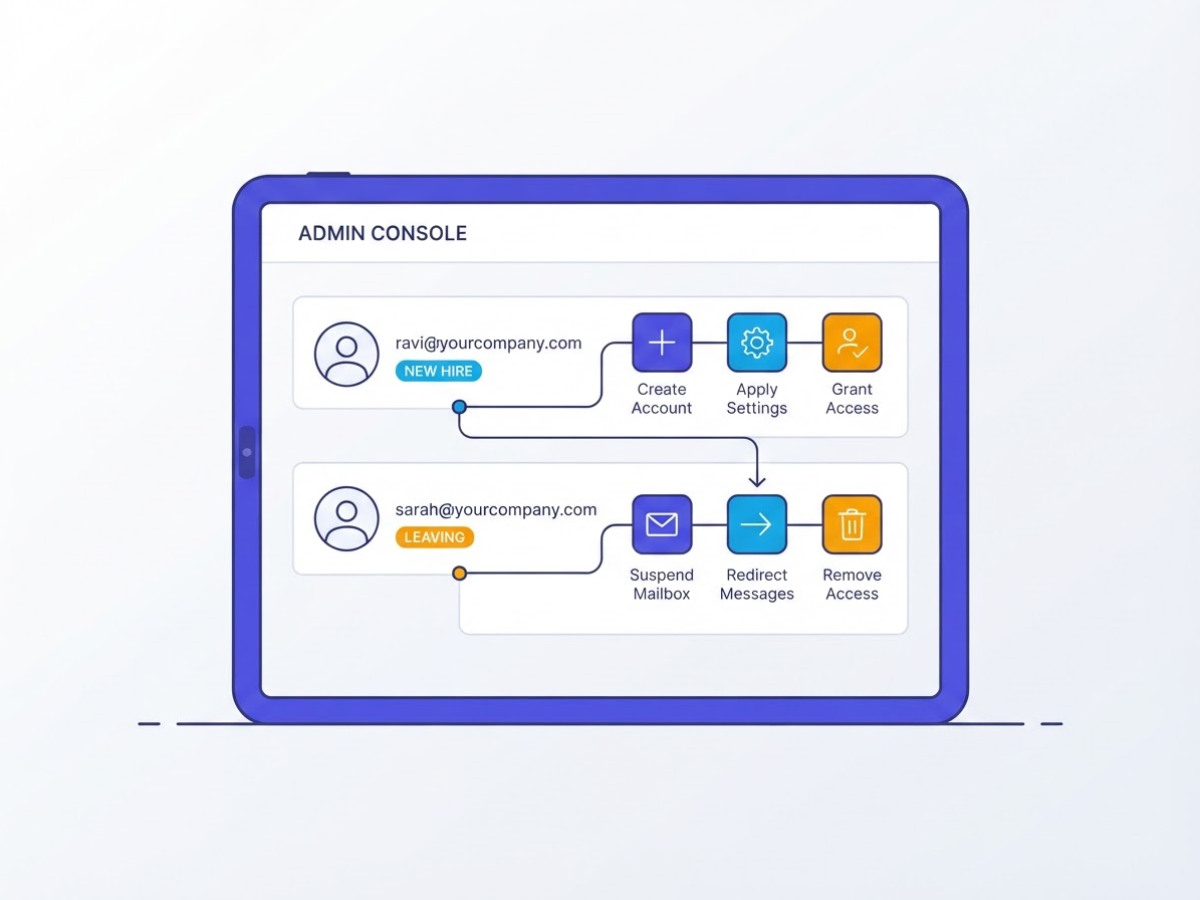
An email service for business gives each employee a professional mailbox on your company domain, such as ravi@yourcompany.com, instead of a free Gmail or Outlook address. In practice, you also get aliases, forwarding rules, shared calendars, contacts, file storage, spam filtering, mobile access, and an administrator console for managing users and security.
The administrator console is the part people underestimate. When a new employee joins, you can create an account, apply the right settings, and grant access without passing around passwords. When someone leaves, you can suspend the mailbox, redirect incoming messages, transfer files, and remove access immediately. The setup can be irritating, especially when DNS records or old mail imports go wrong, but central control is far safer than leaving business email tied to one person’s laptop.
Typical inclusions look like this:
- Mailboxes: Individual inboxes with your domain name.
- Aliases and forwarding: Addresses such as
sales@that route messages without needing another paid user. - Shared work tools: Calendars, contacts, storage, and video meetings.
- Protection and access: Spam filtering, password controls, two-step verification, and phone or tablet access.
- Administration: User creation, account suspension, permissions, recovery, and billing management.
A mailbox is not the same thing as an email marketing platform. Your team uses business email to reply to customers and coordinate internally. A campaign platform sends newsletters, promotions, and automated sequences to subscribers, while handling consent, unsubscribe requests, audience lists, templates, and delivery reports. Using employee inboxes for a 5,000-person promotion is a poor shortcut and can damage your domain’s reputation.
Pro Tip: Create role-based addresses such as support@ and billing@ separately from individual employee accounts so responsibilities can continue when a team member changes.
For a concrete comparison, Google Workspace’s India business offering combines custom business email with 30 GB of pooled storage per user and 100-participant video meetings. Microsoft 365 Business plans also support branded email on your company domain and target organisations with up to 300 users. Neither choice removes the need to configure accounts carefully.
With that distinction clear, the next step is matching mailbox features to the size and working habits of your business.
Is hosted business email right for your team?
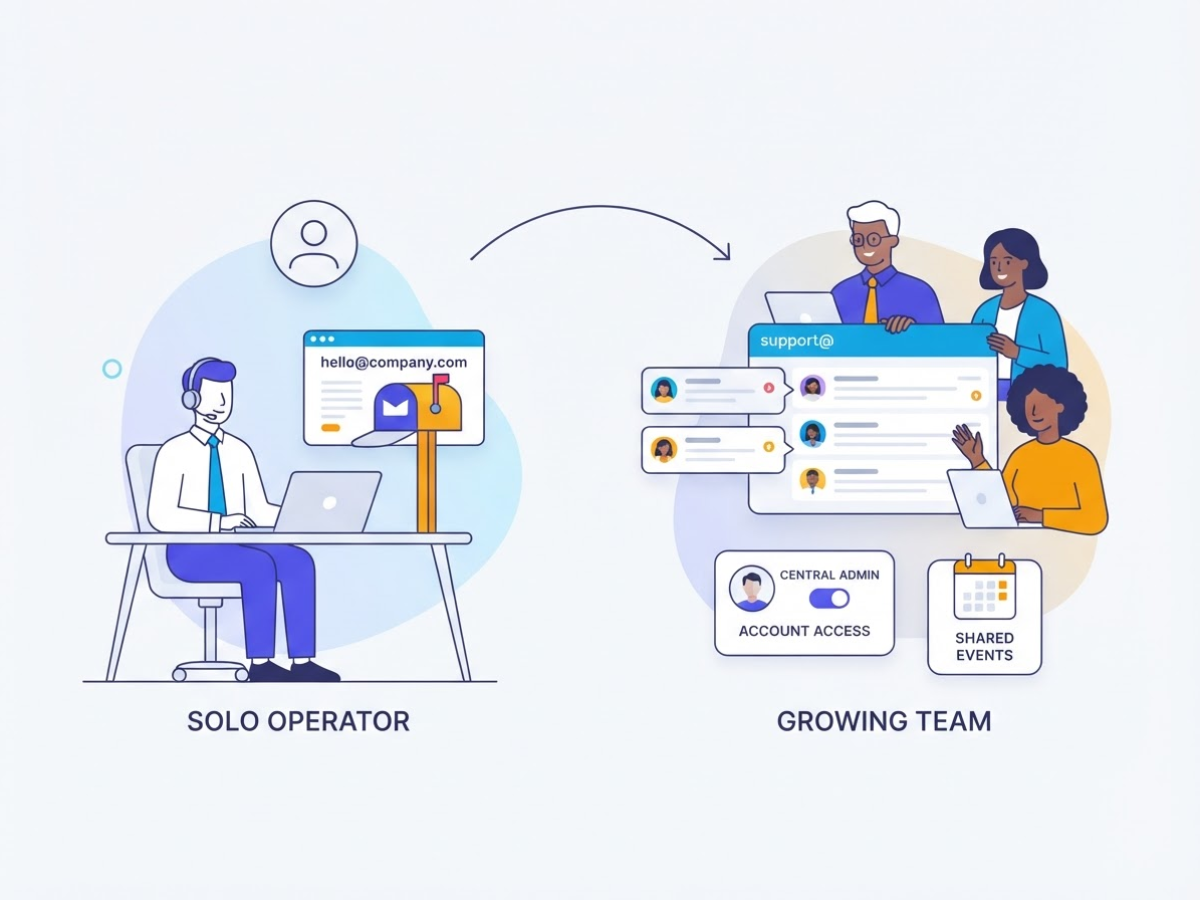
The right choice depends less on your headcount than on how your team actually communicates. A solo consultant may need one branded mailbox and an alias such as hello@company.com, while a growing support team may need shared inboxes, permissions, mobile access, and an administrator who can disable accounts on a former employee’s last day.
Use this quick fit check:
- Solo operator: A basic mailbox is usually enough if you mainly handle personal sales conversations and client replies.
- Small team: Add aliases, shared inboxes such as
support@, calendar sharing, and central user controls. - Multi-location company: Look for delegation, location-based groups, archive policies, and reliable mobile access.
- Agency: Shared client addresses and separate identities matter more than another few gigabytes of storage.
- Ecommerce brand: Keep order confirmations and password resets separate from promotional campaigns.
- Compliance-led organisation: Check retention, audit logs, encryption, administrator roles, data location, and export options before buying.
Before comparing plans, write down the number of users you need now and in 12 months. Then ask whether you need aliases, shared inboxes, storage per user, document collaboration, video meetings, mobile apps, migration assistance, spam controls, and administrator reporting. Migration support is easy to ignore until old mail arrives in broken folders or DNS changes interrupt delivery.
Pro Tip: Estimate users for the next 12 months, not only today; switching mailboxes after a rapid hiring phase can create avoidable migration and downtime work.
A basic mailbox wins when you send ordinary one-to-one messages and already use separate tools for files, meetings, and documents. Pay for a productivity suite when your team edits files together, schedules meetings, needs central access control, or would otherwise stitch together four subscriptions. For reference, Google Workspace Starter includes custom email, 30 GB pooled storage per user, and 100-participant meetings, with India pricing displayed in INR. Introductory rates can hide the real bill, so calculate users multiplied by the regular monthly price, plus taxes, add-ons, migration, and support.
Do not push every message through the same mailbox. Transactional receipts and password resets need dependable application sending; personal sales mail belongs in individual inboxes; bulk promotions need a campaign platform, consent controls, unsubscribe handling, and domain authentication. Gmail treats close to 5,000 messages to personal Gmail accounts in 24 hours as bulk sending, so volume growth can create deliverability work quickly.
With those boundaries clear, you can compare providers without paying suite prices for a mailbox you barely use.
Business email vs email marketing service: which one do you need?
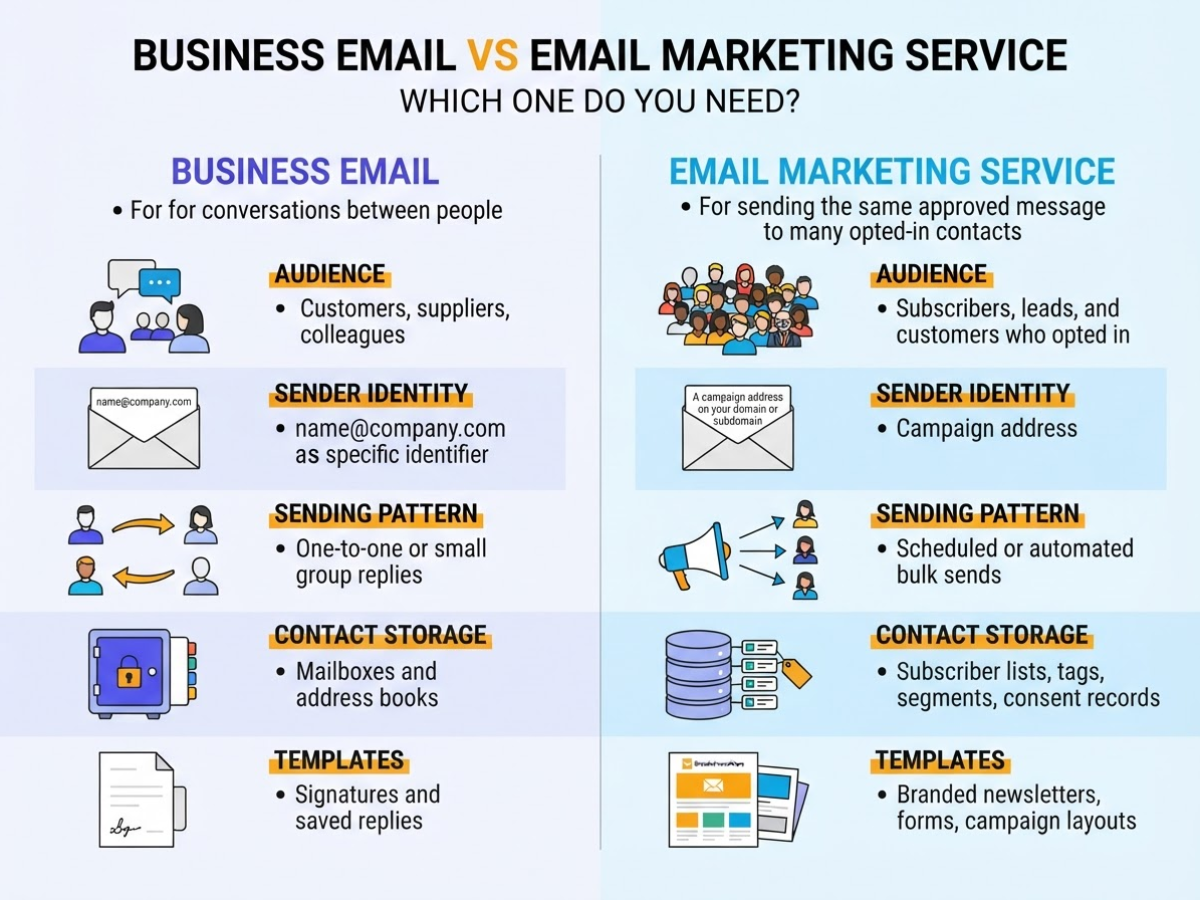
When I help a small team choose email tools, the confusion usually starts with the word “email.” A hosted business mailbox is for conversations between people. An email marketing service is for sending the same approved message to many opted-in contacts.
| Area | Business email | Email marketing service |
|---|---|---|
| Audience | Customers, suppliers, colleagues | Subscribers, leads, and customers who opted in |
| Sender identity | name@company.com |
A campaign address on your domain or subdomain |
| Sending pattern | One-to-one or small group replies | Scheduled or automated bulk sends |
| Contact storage | Mailboxes and address books | Subscriber lists, tags, segments, and consent records |
| Templates | Signatures and saved replies | Branded newsletters, forms, and campaign layouts |
| Automation | Filters, forwarding, and calendar rules | Welcome sequences, reminders, and behaviour-based journeys |
| Analytics | Delivery and basic message status | Opens, clicks, bounces, unsubscribes, and conversions |
| Unsubscribe handling | Usually manual | Built-in unsubscribe links and suppression lists |
| Billing | Usually per mailbox or user | Usually by contacts, send volume, or both |
Sending a newsletter from employee inboxes looks cheap until something goes wrong. A long CC list can expose every recipient’s address, while repeated bulk sends can hurt the domain’s reputation and make ordinary support emails land in spam. You also have to track consent, remove opt-outs, handle bounces, and prove what happened. A personal mailbox is the wrong place for that bookkeeping.
Pro Tip: Keep marketing campaigns on a consistent, recognisable sending domain or subdomain and reserve employee mailboxes for genuine person-to-person communication.
The compliance difference becomes more important at volume. Gmail treats a sender as a bulk sender when it reaches close to 5,000 messages to personal Gmail accounts within 24 hours. Google then expects authentication and an easy unsubscribe method, among other delivery requirements, as described in its bulk-sender guidance.
For a local shop with 300 opted-in contacts, a modest marketing service may be enough, even if you send only once a month. For product launches, weekly newsletters, or several thousand contacts, dedicated campaign controls are worth the cost. You can still use hosted inboxes for quotes, replies, and support while the marketing service handles consent and reporting.
That split is usually the sensible setup: pay for mailboxes according to staff count, then pay for campaigns according to list size or volume. Next, compare the features that matter when choosing the actual business email service.
How to set up an email service for business
I treat the setup as a short deployment project, not a five-minute signup. The mailbox screens are usually easy; DNS mistakes, forgotten admin accounts, and rushed migrations cause the real trouble. Work through this checklist in order.
- Prepare the domain and plan. Confirm that you control the domain registrar account and record who can change DNS. Choose the mailbox plan, list every named user, and create role addresses such as
sales@,support@, andaccounts@. Store the administrator username, recovery email, and emergency access details in your password manager, not in a spreadsheet shared with the whole team. If you use Google Workspace, its email hosting setup process covers the provider-specific screens. - Point mail to the provider. Add the provider’s MX records exactly as supplied, including priority values, and remove conflicting old MX records. Verify routing by sending a test message before moving staff. DNS changes can appear inconsistent for several hours, so do not delete the old service because one laptop happens to receive mail.
- Authenticate the domain. Publish one SPF record, generate DKIM keys in the provider console, and add the public key to DNS. Start DMARC with a monitoring policy such as
p=noneand review reports before moving to quarantine or reject. Google’s bulk-sender requirements also emphasize SPF, DKIM, DMARC, valid DNS, TLS, and low spam rates. Two SPF records are a common, surprisingly annoying mistake. - Build the accounts. Create mailboxes, aliases, shared groups, signatures, recovery methods, and mobile access. Require MFA for every user, especially administrators, then set spam, phishing, attachment, and forwarding controls. Test recovery while you still have admin access. Do not assume a group address behaves like a shared inbox; check who receives replies and who can send from it.
- Migrate in stages. Move old messages and contacts in a pilot batch first, then schedule the wider cutover outside your busiest hours. Tell staff the new sign-in address, password-reset route, and mobile steps. Keep the old service available during verification, and forward or collect mail there so a delayed DNS update does not hide customer messages.
- Test like a customer. Check inbound and outbound delivery, replies, attachments, forwarding, signatures, and authentication results from Gmail, Outlook, and at least one iOS or Android device. Send key messages such as password resets, invoices, and support replies. Confirm that large files, aliases, and group replies work, then inspect spam folders and message headers.
- Document the handover. Record renewal dates, admin access, DNS ownership, backup expectations, retention rules, migration notes, and provider support contacts. Add a second administrator before launch. This record saves hours when a domain renewal or locked account becomes an emergency.
Once these checks pass, you can launch with confidence and keep the old service only for the agreed verification window.
Common business email mistakes to prevent after launch
The launch is not the finish line. In client accounts I have supported, small shortcuts after setup caused more trouble than the initial DNS work, especially when nobody owned the mailbox, campaign, or security settings.
Common mistakes to avoid:
- Using a personal Gmail or Outlook address as your public identity when
you@yourcompany.comis available. A domain mailbox looks more credible and keeps customer conversations tied to the business rather than one employee’s personal account. - Sending unsolicited campaigns, buying lists, hiding who sent the message, or making the unsubscribe link difficult to find. These habits create complaints quickly. Google’s bulk-sender requirements include authentication and easy unsubscribe controls, and you should apply that discipline even before you reach bulk-sender volume.
- Ignoring bounces, spam complaints, and engagement. Remove invalid addresses, suppress anyone who opts out, and review recipients who never open or click. A list that grows while its quality falls is not a marketing win. These email marketing tips for 2026 are useful when you need a practical cleanup routine.
- Giving every employee administrator access. Require MFA, protect recovery email addresses and phone numbers, and give each person only the permissions their role needs. Shared passwords are convenient for about a week, then become an audit and offboarding headache.
- Leaving former employees active. Your offboarding checklist should disable the account, revoke sessions and app access, redirect business-critical mail under a documented policy, transfer ownership, and remove forwarding rules.
- Treating compliance as optional. CAN-SPAM primarily covers commercial email, gives recipients the right to stop receiving messages, and includes penalties for violations. Keep your sender identity and physical business details clear, and process opt-outs promptly.
Set a recurring review, at least quarterly, for SPF, DKIM, and DMARC records, user access, billing, storage limits, forwarding rules, recovery settings, and campaign permissions. Monthly checks make sense for active lists because a bad import or compromised account can cause damage before a quarterly meeting arrives.
Once these controls are routine, the next decision is how to measure whether your business email is actually reaching and helping the right people.
My honest take on choosing business email
I’ve helped small businesses choose and set up business email, and I’ve learned that the biggest feature list rarely wins. The best email service for business is the one your team can administer securely, affordably, and consistently six months after the sales call. Extra calendars, storage, and automation mean little if nobody knows who owns the DNS records or where the recovery details are kept.
Here’s the contrarian point: a cheap mailbox can become the expensive option. I’ve seen businesses lose time during migrations because support would not help, then discover they had no clear control over SPF, DKIM, DMARC, or archived messages. One missed authentication record can also hurt delivery, while weak account ownership creates a painful problem when an employee leaves.
For a small Indian business, I recommend starting with a branded domain and a documented setup. Record the admin account, DNS changes, recovery process, and billing owner. It feels like paperwork until the person who configured everything resigns. Then add shared mailboxes, collaboration tools, or marketing features only when your actual workflow demands them.
Keep employee email separate from promotional sending. Your staff inboxes should not share the same sending process as newsletters or bulk campaigns. When I compare providers, I weigh the total cost, support quality, migration help, authentication controls, and deliverability, not just storage limits or an attractive introductory price.
— AVM Cloud Content Strategy Team
Set up business email with a practical growth path
When I help businesses choose an email service for business, the first mistake I see is choosing a mailbox plan before checking the domain and staff list. Start by confirming your domain, noting how many mailboxes you need, and deciding whether you need hosted email for daily work, campaign tools for promotions, or both. Mixing those needs often creates extra cost and a messy setup.
AVM Cloud, through affordable domain and hosting services in India, can be a practical starting point if you also want to compare email marketing or SMS marketing options. Review the available services, then ask the team about setup or migration support. I would not change DNS records or move active mailboxes until someone has checked your current configuration. If you want help with the technical side, this Google Workspace email hosting setup guide can help you prepare the right questions before contacting the team.
Frequently Asked Questions
How much does a business email address cost in India?
A business email address in India may cost anywhere from a few hundred to several thousand rupees per user each year, depending on storage, support, collaboration tools, and billing terms. Compare the complete per-user price in INR, including migration, aliases, security features, and renewal charges, because a low first-year offer can hide a much higher second-year bill.
Can I use Gmail for my business email?
Yes, you can use Gmail as the interface for a custom-domain mailbox through a business email service, such as an address ending in your company’s domain rather than @gmail.com. A free personal Gmail account is not the same as a managed business mailbox with domain ownership, administrator controls, and business security settings, and the difference becomes painful when an employee leaves.
What is the difference between business email and professional email?
In most commercial use, both terms mean email connected to a company-owned domain, such as name@yourcompany.in, instead of a free personal address. The practical test is who controls the domain, how accounts are managed, and whether the service provides essentials such as spam protection, authentication, and reliable delivery for your team of 5 or 50.
How many emails can I send from a business email account per day?
The limit depends on your provider, account type, sending reputation, and the recipient’s mail service, so a normal mailbox is a poor choice for bulk campaigns. Gmail treats about 5,000 messages sent to personal Gmail accounts within 24 hours as the bulk-sender threshold, which can trigger additional requirements and delivery problems if your list or consent records are weak.
Do I need a separate email service for newsletters?
Usually, yes, if you send recurring promotional or subscriber messages to more than a small handful of people. A dedicated marketing service handles consent records, unsubscribe requests, templates, segmentation, and campaign reporting, while employee mailboxes are better for individual conversations and can suffer restrictions when you send hundreds of newsletter messages at once.
Recommended reads
- Google Workspace Email Hosting Setup Guide
- 6 Email Marketing Tips To Hit Your Goals In 2026
- Sms Vs Email Which Is Better For Your Business In 2026
- What To Look For In A Web Host Check These 7 Tips
Sources
- Business streamlining and collaboration solutions | Google Workspace
- Microsoft 365 Pricing for Business: Plans & Features
- Email sender guidelines FAQ
- Email sender guidelines – Gmail Help
- Email Marketing ROI: What leads to better returns?
- Email Marketing Benchmarks & Industry Statistics | Mailchimp
- Rebranding and Re-engaging: The Biker Company’s Path to Success with Mailchimp
- Lazy Gatekeepers: A Large-Scale Study on SPF Configuration in the Wild
- CAN-SPAM Act: A Compliance Guide for Business