

Step-by-Step Bulk SMS Setup with DomainAdda
TL;DR: To set up bulk SMS with DomainAdda, choose a promotional or transactional plan, complete India’s TRAI DLT requirements, prepare a consent-based contact list, and confirm your sender details. Import an Excel file or connect the API, test with 1–2 numbers, then review delivery reports before sending to the full list. Promotional campaigns and transactional alerts follow different rules.
Sending thousands of customer updates by hand can consume an afternoon and still leave someone wondering who was missed. I have seen teams upload the wrong spreadsheet, use an unapproved sender ID, and find the problem only after a campaign stalls. TRAI reported that more than 27,000 Principal Entities had registered their commercial-message transmission chains by November 30, 2024, while requiring commercial messages to use registered headers and follow traceability rules. This guide covers DomainAdda plan selection, contact preparation, sender and DLT checks, web-panel sending, transactional API access, testing, delivery reports, and common fixes.
Table of Contents
- What You Need Before Setting Up Bulk SMS with DomainAdda
- Select a DomainAdda SMS Plan for Your Use Case
- How to Send Your First Bulk SMS from the Web Panel
- When to Use DomainAdda’s API Instead of Manual Sending
- Compliance and Common Setup Mistakes to Avoid
- Measure Results After Your First DomainAdda SMS Campaign
- My honest take on setting up Bulk SMS with DomainAdda
- Ready to Set Up Bulk SMS with DomainAdda?
- Frequently Asked Questions
- Recommended reads
- Sources
| Point | Details |
|---|---|
| Choose the right plan | Use promotional plans for campaigns, while transactional plans suit application or API delivery. |
| Prepare compliant data | Clean your list, document consent, and verify sender and DLT requirements before uploading records. |
| Import contacts easily | DomainAdda lets you import mobile-number records from an Excel file into its web-based SMS panel. |
| Test before sending | Send a small test batch to check the sender ID, copy, links, encoding, and delivery behavior. |
| Review delivery reports | Check reports for delivered, failed, refunded, potentially invalid, and suppressed numbers after each send. |
What You Need Before Setting Up Bulk SMS with DomainAdda
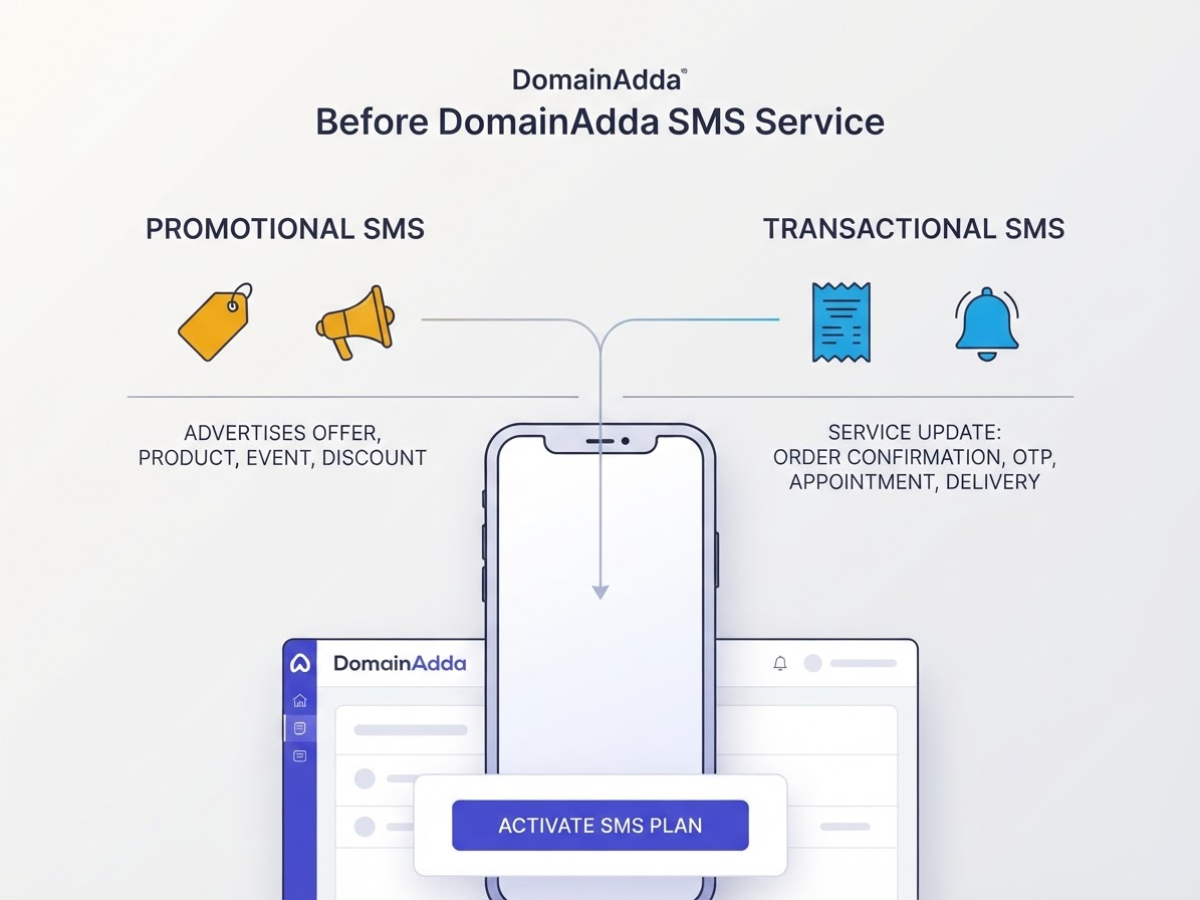
Before opening the DomainAdda panel, decide what kind of message you are sending. Promotional SMS advertises an offer, product, event, or discount. Transactional SMS delivers a service update such as an order confirmation, login OTP, payment receipt, appointment reminder, or delivery status. Mixing the categories is a common mistake because they follow different approval and delivery rules.
Pro Tip: Decide whether the message is promotional or transactional before buying credits, because the compliance path and technical setup can differ.
Have these inputs ready:
- DomainAdda account: You need an active account and the correct SMS service or plan.
- Mobile-number list: Clean the list, remove duplicates, and keep proof of consent where required. The panel accepts spreadsheet records, including Excel files, but you remain responsible for list quality.
- Approved sender identity: Prepare your sender ID or header before building the campaign.
- Message copy: Keep the text within the relevant template and category. Promotional wording inside a service message can trigger rejection or filtering.
- Campaign objective: Define the one action or update the SMS must deliver, such as “confirm payment” or “announce a 20% sale.”
Use the web-based panel when someone will upload a spreadsheet and send a one-off or occasional campaign. It is easy to inspect, but manual uploads leave room for an outdated file, wrong column, or accidental resend. For automated events, use API access so your application can trigger a message after a purchase, login request, or ticket update. DomainAdda’s transactional SMS service includes HTTP/XML/API access and DLT registration.
DLT registration, sender headers, consent records, and approved templates are prerequisites. Under TRAI guidance, commercial messages require a registered header, and a commercial header can contain no more than 11 alphanumeric characters. Check these items before purchasing credits. A technically correct campaign can still fail compliance checks.
With those pieces ready, choose the DomainAdda workflow that fits the job.
Select a DomainAdda SMS Plan for Your Use Case
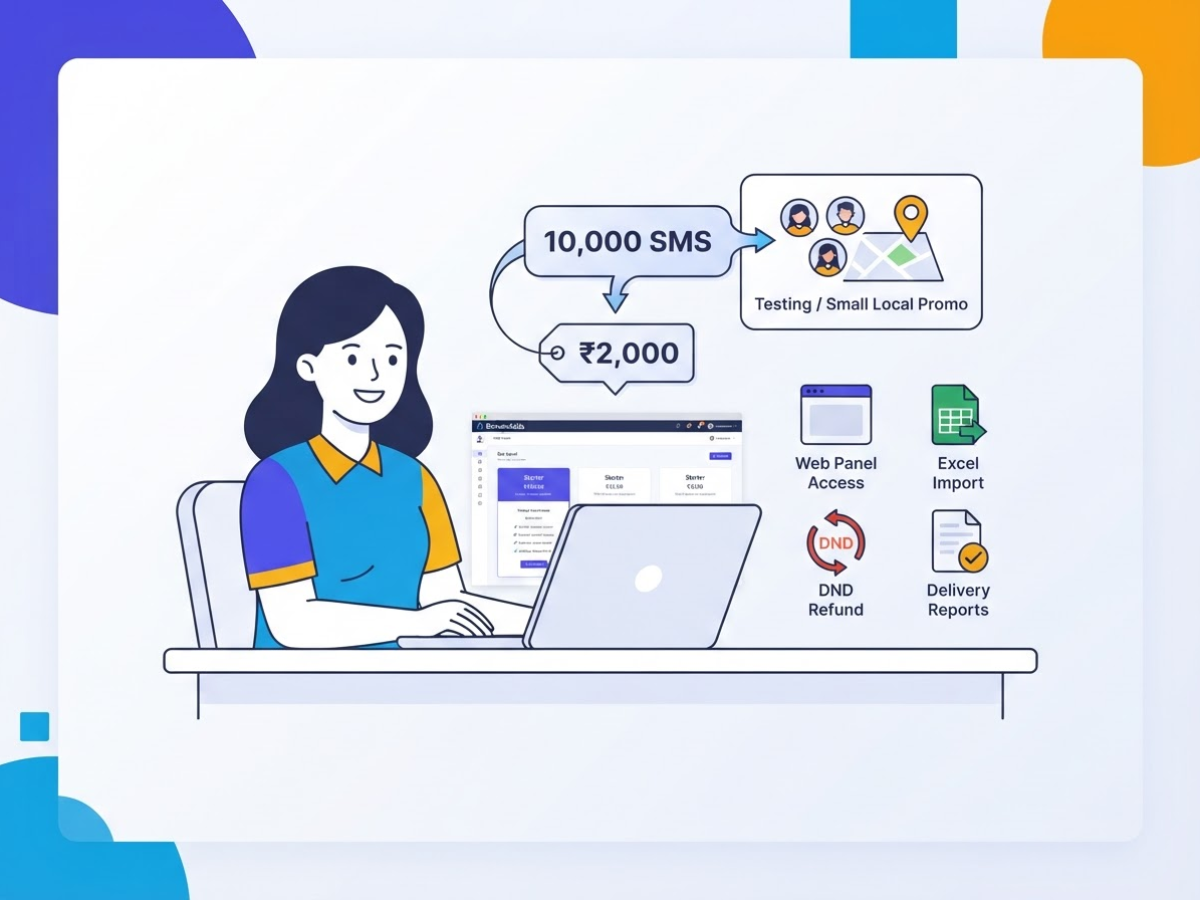
Pick the plan based on the campaign you will actually run, not the largest number on the pricing page. For a one-off test, local promotion, or small customer list, the promotional Starter plan is a sensible entry point. It gives you 10,000 SMS for ₹2,000, with unlimited validity, web panel access, Excel import, DND refund, and delivery reports. The panel is convenient, although a badly formatted spreadsheet creates needless cleanup work.
| Plan | Promotional volume and price | Best fit |
|---|---|---|
| Starter | 10,000 SMS for ₹2,000 | Testing, small lists, occasional campaigns |
| Advance | 50,000 SMS for ₹7,500 | Regular campaigns and larger customer lists |
| Pro | 100,000 SMS for ₹13,000 | Large audiences or frequent sends |
Starter works for 2,000 messages per month, a quarterly promotion, or an initial response test. Unlimited validity helps because unused credits do not expire on an artificial schedule. The catch is clear: weekly campaigns or a growing list will make Starter a false economy.
Choose Advance when your monthly requirement approaches 20,000 to 40,000 messages, especially for recurring offers, event reminders, or multi-location campaigns. The promotional Advance plan lists 50,000 SMS at ₹7,500, while the Pro plan lists 100,000 SMS at ₹13,000](https://domainadda.com/bulk-sms-service/). Pro suits a large customer base or frequent sends where monitoring credit usage after every campaign is a nuisance.
Pro Tip: Estimate sends by recipient count multiplied by campaign frequency, then add a buffer for retries and operational tests instead of choosing only by headline volume.
Do not choose a basic promotional plan when your application must send messages automatically. OTPs, order updates, alerts, and similar traffic need a transactional SMS plan with HTTP/XML/API access, DLT registration, sender ID, and live delivery reports. Manually uploading an Excel file for every order is a frustrating workaround. If you connect SMS to business software, review this guide to integrate DomainAdda SMS APIs with Busy software.
Before buying, check four points:
- Monthly volume: Under 10,000 usually points to Starter; higher recurring volume points to Advance or Pro.
- Automation: Manual campaigns can use the panel; system-triggered messages need API access.
- Message type: Promotions differ from OTPs, invoices, and delivery alerts.
- Reporting: Choose transactional access when live delivery status matters.
Next, prepare the spreadsheet and sender details for a controlled first send.
How to Send Your First Bulk SMS from the Web Panel
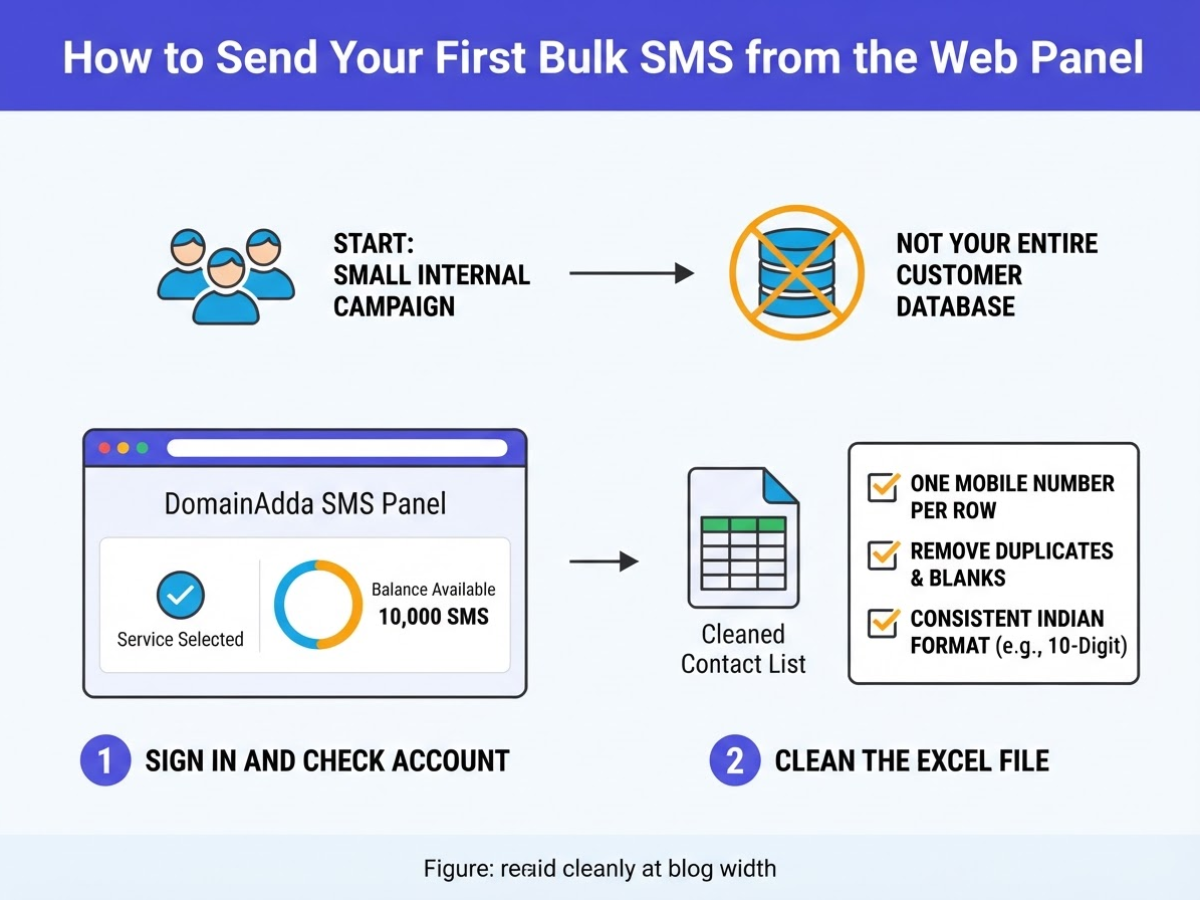
Start with a small internal campaign, not your entire customer database. A first send exposes formatting errors, sender-ID issues, and message-length surprises while the audience is manageable.
- Sign in and check the account. Open the DomainAdda SMS panel, select the intended SMS service, and confirm the available balance. A low balance can look like an upload problem when it is simply insufficient credit.
- Clean the Excel file. Keep one mobile number per row in a clearly named column. Remove duplicates, blank rows, spaces, brackets, and punctuation. For Indian recipients, use one consistent format, such as ten-digit numbers or the country-code format accepted by your account. Do not mix
9876543210,+919876543210, and00919876543210unless the panel supports all three. Move incomplete, landline, and invalid records to a separate sheet rather than deleting them. - Import the contacts. Open the Excel import workflow, choose the cleaned file, map the mobile-number column if prompted, and submit it. DomainAdda documents that users can import mobile-number records from Excel into its web-based SMS panel. Compare the accepted count with your spreadsheet total. If you expected 1,000 contacts but see 943, stop and investigate.
- Build the campaign. Enter the approved sender ID, message text, and a short label such as
Diwali_Offer_2026. Select the required template or approved content details. Check every merge field manually. One misspelled variable can produce a blank or incorrect name. - Test before release. Add two or three internal numbers on different networks. Check the sender ID, spelling, links, line breaks, character count, and delivery speed on each phone. If SMS will run alongside another channel, review how bulk SMS can work with email marketing before scheduling both messages too closely together.
Pro Tip: Keep a permanent copy of the exact Excel file and message version used for each send so delivery questions can be audited later.
- Launch and document it. Choose send now or schedule the campaign, review the final audience count, and release it only after the test passes. Record the send time, audience size, sender ID, exact message, and expected outcome. Save the delivery report when available.
That record makes the API decision easier when the same work starts repeating.
When to Use DomainAdda’s API Instead of Manual Sending
Manual sending fits a finished list and a one-off campaign. Upload an Excel file, choose the sender details, write the message, and review the report. It is simple, but someone must repeat the work whenever a customer places an order or requests a login code.
API sending fits events that should trigger without human intervention. Order updates, OTPs, appointment reminders, payment notices, and account alerts belong here. A manual upload delay can make the message arrive after the customer has already taken the next step.
| Sending method | Best for | What you do | Main trade-off |
|---|---|---|---|
| Web panel | Campaigns and occasional announcements | Import an Excel list, compose the message, and send manually | Fast to start, but repetitive and prone to spreadsheet errors |
| API | Website, software, and business-system events | Let your application submit each message when an event occurs | Requires development, testing, authentication, and error logging |
For integrations, check that your transactional plan includes HTTP/XML/API access, DLT registration, an unlimited sender ID, and live delivery reports, as listed on DomainAdda’s transactional SMS plans. A missing or incorrect sender configuration can stop an otherwise valid request.
The minimum API flow is direct: authenticate, pass the recipient and sender parameters, submit the message, capture the response, and log the request against the order or user record. Retain the recipient reference, message type, timestamp, provider response, and final delivery state. Without that trail, support staff cannot investigate a missing OTP properly.
DomainAdda’s Java transactional SMS example shows the endpoint sms.domainadda.com/vendorsms/pushsms.aspx and parameters including user, password, msisdn, sid, msg, fl, and gwid. Use it as a request-shape reference, then confirm current credentials, transport, and response handling before production use.
Test internally first. Force success and failure cases, check duplicate-event handling, and verify that logs record the provider response. Once the test passes, the BUSY software integration guide provides a software-specific next step.
Compliance and Common Setup Mistakes to Avoid
The costliest SMS mistakes happen before you press Send. Confirm your registered header, sender chain, approved template, and DLT requirements before commercial traffic leaves the DomainAdda panel. TRAI’s traceability requirement started on 1 November 2024, and the transition deadline was later extended to 30 November 2024【https://www.trai.gov.in/sites/default/files/2024-12/PR_No.90of2024.pdf】. Treat those dates as a compliance baseline, not paperwork to finish after launch.
A header that looks correct in a draft can still be unregistered or mismatched with the sending entity. Check template variables, approval status, sender ID, and route before importing an Excel list. Avoiding common bulk SMS marketing mistakes is mostly about catching these dull details early.
Never upload a purchased database and assume a large file equals permission. Keep the consent source and date for every recipient, remove duplicate numbers, suppress invalid records, and honour opt-outs. A customer who replied “STOP” should not receive the next promotion because their number appeared in an old spreadsheet.
Common campaign mistakes include:
- Leaving the business name unclear.
- Writing a long message that splits into multiple SMS segments and raises the cost.
- Using broken, expired, or tracking-heavy links.
- Adding unsupported characters that trigger unexpected Unicode segmentation.
- Sending promotional traffic at inappropriate hours.
- Assuming every imported number received the message because the upload completed.
Review the campaign report after sending. Separate failed, refunded, and undelivered records from successful deliveries, then investigate before retrying. A DND refund or API acceptance response does not prove that the recipient read the message.
Pre-send checklist
- Header, sender chain, and DLT template approved
- Consent records present; duplicates and opt-outs removed
- Sender identity, links, characters, and message length checked
- Send time reviewed for the recipient’s location
- Test message delivered on the intended handset
- Failed, refunded, and undelivered records assigned for follow-up
With those checks complete, measure what the campaign actually produced.
Measure Results After Your First DomainAdda SMS Campaign
The first send gives you numbers, not a verdict. When I review a DomainAdda campaign, I separate what happened to the messages from what recipients did afterward. A high delivery rate is useful, but it does not prove that the offer worked.
Use this review timeline:
- Immediately after sending: Record attempted, delivered, failed, and refunded messages. Reconcile the report with your SMS balance instead of guessing from the original audience size.
- Within 24 hours: Count replies, link clicks, calls, form submissions, purchases, or another defined response. Delivery means the carrier accepted the message for delivery, not that someone read it.
- After the campaign window closes: Calculate delivery rate as delivered messages divided by attempted messages. Calculate cost per useful action as campaign cost divided by completed actions. A ₹2,000 campaign producing 20 bookings costs ₹100 per booking, regardless of its delivery percentage.
Keep one reporting table for every send:
| Campaign | Audience | Send time | Message version | Delivery rate | Outcome |
|---|---|---|---|---|---|
| Diwali offer | 10,000 | 10 Oct, 6:30 PM | A, short CTA | 96.4% | 84 purchases |
Add failed messages, refunds, replies, and clicks in notes if needed. For planning, timing your bulk SMS sends for maximum engagement is more useful than sending the full list at the same hour every time.
For the next campaign, split the audience by customer status, location, purchase history, or prior engagement. Test one variable at a time: timing, call to action, offer, or message length. Otherwise, you will not know what caused the change.
Klaviyo’s 2025 Americas benchmark reports a 37.93% average SMS open rate and 1.29% click rate. Use those figures as reference points, not promises. Your useful-action rate and cost per result should decide the next send.
My honest take on setting up Bulk SMS with DomainAdda
I have found that the hardest part of setup is rarely the send button. It is choosing the workflow, cleaning the list, confirming consent, and proving that the campaign worked. For occasional promotions, DomainAdda’s web panel is usually enough. An API fits event-based messages, but it adds credentials, testing, error handling, and another place for things to break.
Here is the contrarian point: the cheapest price per SMS should not decide your provider. A lower unit cost means little if your sender identity is unready, your list contains stale numbers, or you cannot connect delivery with a useful outcome. I would rather pay slightly more for an auditable campaign than save money on messages that create complaints and unclear results.
I also avoid promising a fixed engagement rate. Consent, audience intent, timing, wording, and the offer matter more than a benchmark from another business. Start with a small controlled send, record delivery and response data, check compliance, and increase volume only after the evidence supports it.
— AVM Cloud Content Strategy Team
Ready to Set Up Bulk SMS with DomainAdda?
Before sending the first campaign, review the promotional bulk SMS options for scheduled or one-off campaigns from a web panel. If your application needs order, login, or payment alerts, compare the transactional SMS options instead. Choosing the wrong route creates avoidable rework.
Prepare a clean contact file, sender details, message templates, and the approval information your use case requires. Formatting errors and missing consent records are common onboarding problems. DomainAdda supports panel-based campaigns and API-led transactional messaging, but complete the applicable sender, consent, and regulatory checks before onboarding.
Frequently Asked Questions
How much does it cost to send bulk SMS through DomainAdda?
DomainAdda lists a promotional Starter plan with 10,000 SMS for ₹2,000, an Advance plan with 50,000 SMS for ₹7,500, and a Pro plan with 100,000 SMS for ₹13,000. Check the current plan page before paying because pricing, taxes, and included features can change.
Can I send bulk SMS from an Excel file in DomainAdda?
Yes, DomainAdda says you can import mobile-number records from an Excel file into its web-based SMS panel. Remove duplicates, invalid numbers, formatting errors, and opt-outs first, since a messy spreadsheet can waste credits and create complaints.
What is the difference between promotional and transactional SMS in India?
Promotional SMS advertises offers or campaigns, while transactional SMS covers service messages such as alerts, confirmations, and authentication codes. Choosing the wrong category can affect your sender setup, templates, plan, and compliance process, so verify the applicable rules before sending 1,000 messages.
How long can a TRAI SMS sender ID or header be?
TRAI guidance limits a commercial SMS header to 11 alphanumeric characters or numbers. Confirm that the header is registered for the intended commercial communication, because an attractive sender name still causes delivery trouble when registration does not match the message type.
Does DomainAdda provide an SMS API for automated messages?
DomainAdda lists HTTP, XML, and API access with its transactional SMS plans, so applications can trigger messages without manual uploads. Test at least 4 areas before production: authentication, response handling, character encoding, and duplicate prevention. A working Java request can still send repeated or corrupted messages.
Recommended reads
- Step By Step Guide Of How You Can Integrate Domainadda Sms Apis With Busy Software
- How To Choose The Right Bulk Sms Provider In India
- Avoiding Common Bulk Sms Marketing Mistakes
- Timing Your Bulk Sms Sends For Maximum Engagement
Sources
- Bulk SMS Service – Try APIs, Gateway, Reseller SMS
- Transactional Bulk SMS – Send OTPs, Alerts, Billing Reminders
- Example api code for Transactional SMS in java – Knowledgebase – DomainAdda
- Advice to Senders | Telecom Regulatory Authority of India | Government of India
- Information Note to the Press (Press Release No. 90/2024)
- SECTION 1: EMAIL AND SMS CAMPAIGNS
Connecting Bulk SMS API to Your Website or App
10/11/2026[…] SMS provider. This keeps credentials private and gives you one place to handle provider changes, bulk SMS setup decisions, rate limits, and […]